
Zoho ERP for Nonprofits: The Complete Guide for Indian NGOs (2026)
Your finance team closes the month in Tally. Donations live in a spreadsheet. 80G receipts come out of a Word template. The FCRA account has its own register, grant utilisation is rebuilt in Excel before every donor report, and payroll runs somewhere else again. Sound familiar?
Zoho ERP promises to put all of that in one system. We wanted to know if it actually can for an Indian nonprofit, so we tested it the hard way. We set up a 200-person nonprofit on Zoho ERP and ran a full year of its money through it: donations and 80G receipts, foreign grants under FCRA, a CSR grant, procurement with a grant budget check, payroll and reporting.
This is the guide we wish we’d had before we started. It covers what Zoho ERP is, how each part behaves for a nonprofit, how to set it up, and the 34 limitations we logged along the way. Each section links to a deeper subguide with step-by-step screenshots.
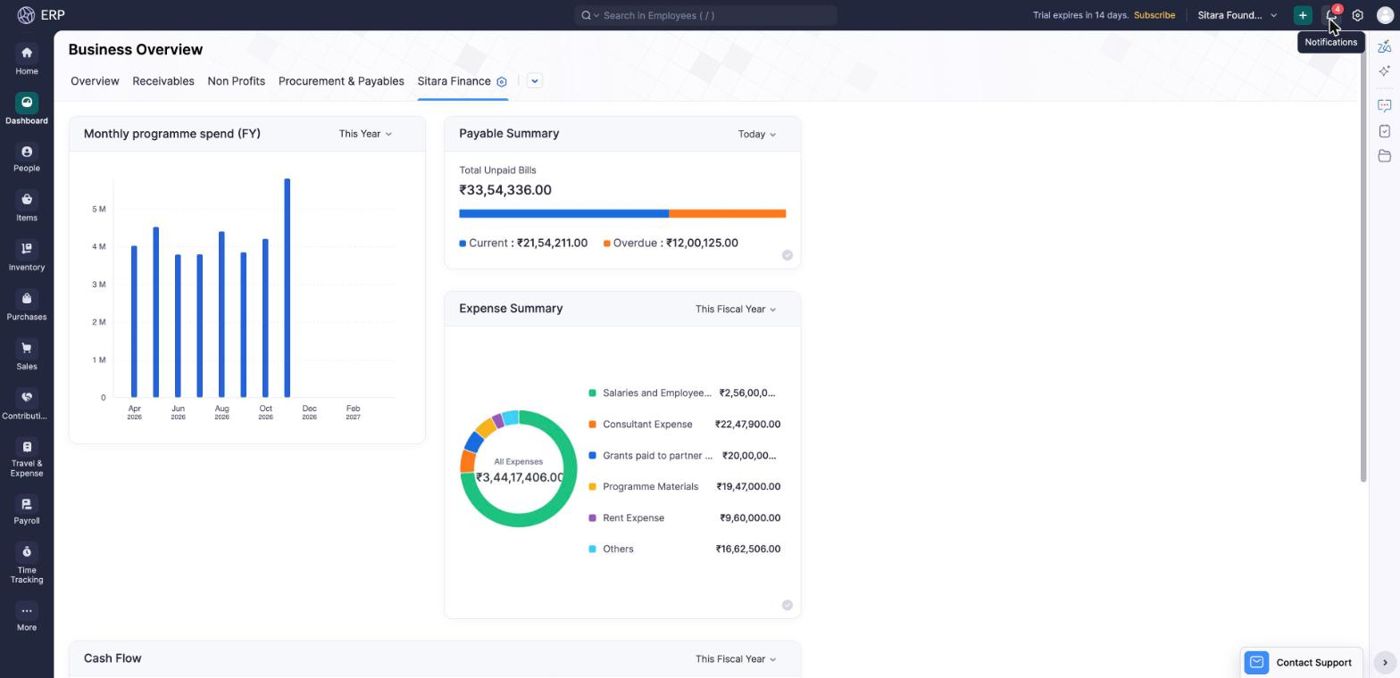 The finance dashboard we built for our test nonprofit. Every name and number in this guide is fictional.
In this guide
- What is Zoho ERP?
- How we tested it
- The scorecard
- Module by module
- Five setup decisions to make on day one
- All 34 limitations, with workarounds
- Our verdict: who should use Zoho ERP
- FAQs
The subguides
- Donations and 80G receipts in Zoho ERP
- FCRA accounting and banking in Zoho ERP
- Grant accounting with reporting tags
- Procurement with a grant budget check
- Payroll for NGOs in Zoho ERP
- Dashboards, reports and branded templates
What is Zoho ERP?
Zoho ERP is Zoho’s finance and operations suite. In one login you get accounting, purchasing, inventory, sales, expenses and travel, payroll, time tracking and reports, all writing to the same books. For nonprofits, the India edition adds a Contributions module: funds, donations, donation types under the Income Tax Act, and 80G receipts.
If you know Zoho Books, the accounting will feel familiar. The difference is that purchasing, payroll and expenses sit inside the same product instead of being separate apps you connect. Here’s the menu our test organisation worked from:
| Module | What a nonprofit uses it for |
|---|---|
| Contributions | Funds, donations, 80G and Non80G receipts |
| Purchases | Vendors, purchase orders, bills, vendor payments |
| Accounting | Chart of accounts, banking, journals, budgets, fixed assets |
| People and Payroll | Employee records, pay runs, payslips, PT and TDS |
| Travel and Expense | Staff claims, advances, trips and policies |
| Reports and Dashboard | Financial statements, grant reports, nonprofit dashboard |
Zoho changes plans and pricing often, so we haven’t quoted prices here. Check current Zoho ERP pricing for India before you budget, and ask about nonprofit discounts.
How we tested it
We built Sitara Foundation, a fictional public charitable trust in Coimbatore, Tamil Nadu. We shaped it like the mid-sized nonprofits we work with so the numbers would behave like a real year:
- About 200 people: 38 at head office, 150 field staff across 40 centres, and contract trainers through an agency
- A budget of about ₹15 crore a year
- 12A, 80G, FCRA and CSR-1 registered
- Two programmes: girls’ education centres in Tamil Nadu and women’s livelihoods in Karnataka
- Two foreign grants (one UK, one US), one CSR grant with a sub-grant to a partner nonprofit, monthly givers, corporate donors and an annual fundraising run
Between April and November 2026 we recorded 62 donations, 55 bills, 9 salary journals and a pay run. Every line carried five reporting tags: Grant, Programme, Geography, Department and Entity.
We tested on a Zoho ERP trial organisation on the India data centre in November 2026. Every donor, staff name, PAN, address and amount you see is made up.
The scorecard
We broke the year into 36 test stops across 7 flows and gave each one a verdict.
| Verdict | What it means |
|---|---|
| Works as shipped (9) | No setup beyond the obvious |
| Works with settings (11) | Configuration or a process change gets you there |
| We built around it (4) | A workflow, function or journal fills the gap |
| Needs a build (4) | Possible, but you’ll need Deluge or Zoho Analytics |
| Gap (5) | No clean answer inside ERP today |
| Not tested (3) | Out of scope for this trial |
Twenty of 36 stops work as shipped or with settings. That’s a strong base for a product that wasn’t designed only for nonprofits. The gaps cluster in three places: FCRA controls, grant costing of salaries, and line-level access for programme managers.
Module by module
Donations and 80G receipts
Each donation carries Section 80G or Non80G and an Income Tax donation type, posts to a fund and a bank account, and prints a receipt with the donor’s PAN, the amount in words and your 80G registration text. That part works out of the box.
The catch is branding. The statutory 80G receipt layout is locked, and the editable template has no 80G wording block. There are also no validation rules on donations, so we built a workflow that flips cash gifts over ₹2,000 to Non80G.
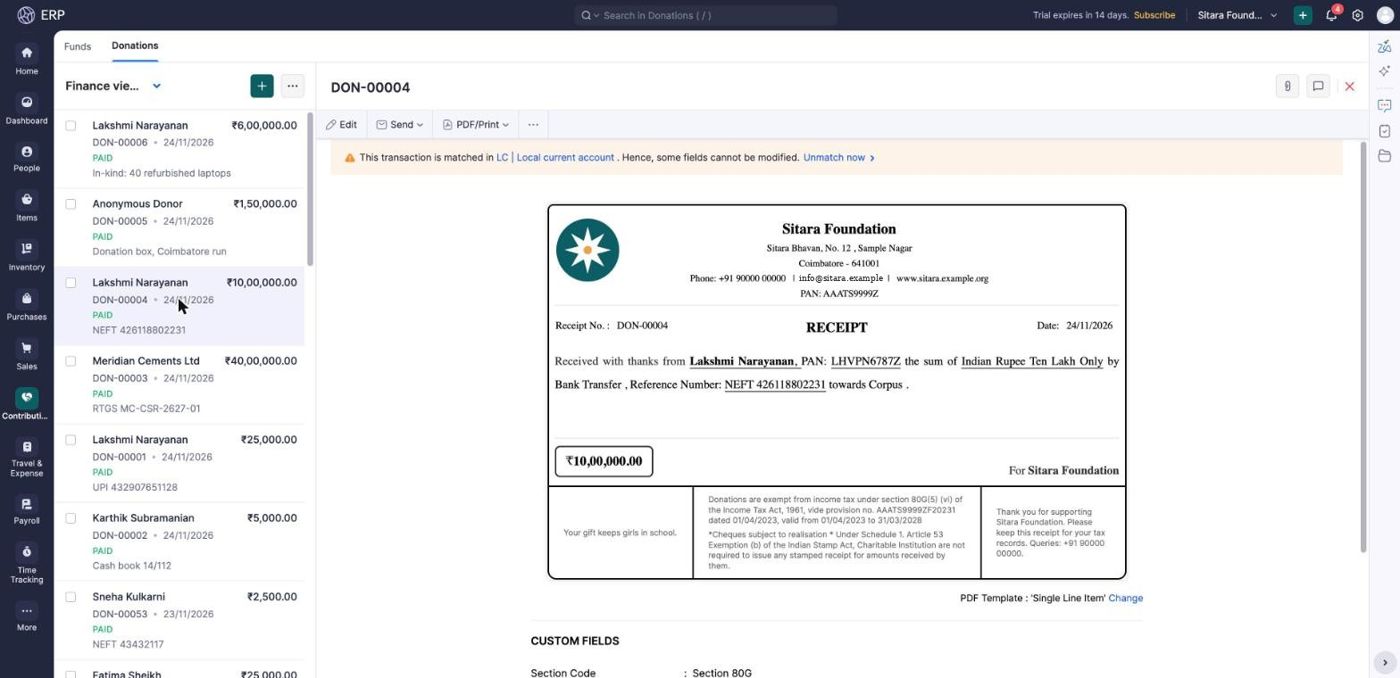 The statutory 80G receipt. Correct content, locked layout.
Read the full subguide: Donations and 80G receipts in Zoho ERP
FCRA and banking
A USD grant tranche posts at the bank rate into the FCRA receipt account and moves to the utilisation account with a transfer. Bank statement import and auto-match worked first time.
What’s missing is a guard rail. Zoho ERP has no FC or LC flag, so nothing stops a transfer from the FCRA account to your local account. Our fix is a set of process controls your CA signs off.
Read the full subguide: FCRA accounting and banking in Zoho ERP
Grant accounting
One custom report, a P&L compared by the Grant reporting tag, gives income and spend per grant on one screen. It’s the single most useful thing we built. It only works if every line is tagged, so we made all five tags mandatory everywhere.
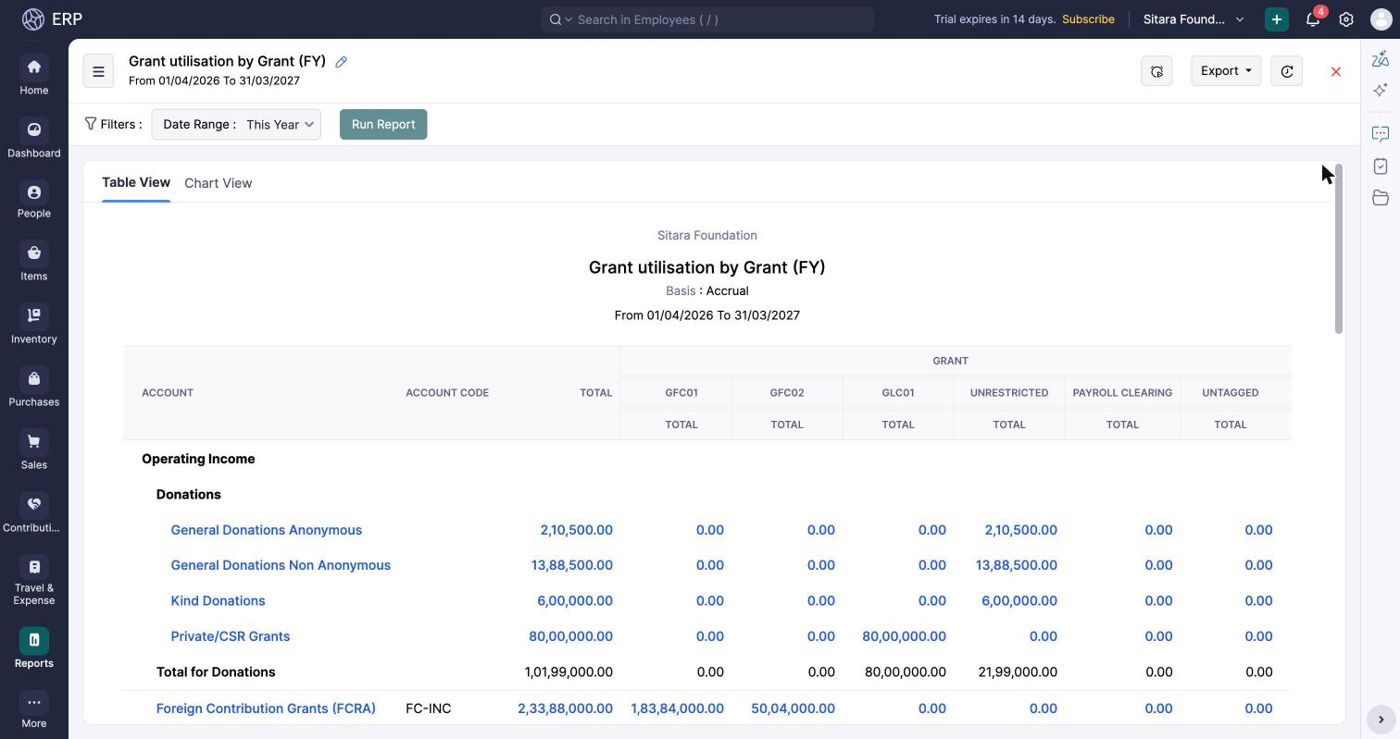 Grant utilisation by grant: one column per grant, plus Unrestricted, Payroll clearing and Untagged.
Read the full subguide: Grant accounting with reporting tags
Procurement
POs and bills split across grants line by line, with GST and TDS. What Zoho ERP doesn’t have is commitment accounting, so an open PO doesn’t reduce a grant’s budget. We built a Deluge function that checks the grant budget on every PO and routes overspends to finance.
Read the full subguide: Procurement with a grant budget check
People and payroll
Statutory Indian payroll with PT, payslips and TDS ran cleanly. Grant costing of salaries doesn’t work yet: employees can’t carry reporting tags and the payroll journal posts as one untagged line. You’ll need an allocation table and a monthly reclass journal.
Read the full subguide: Payroll for NGOs in Zoho ERP
Dashboards, reports and templates
The built-in Non Profits dashboard gives total donations, donors, fund flow by donation type and top donors with no setup. For finance, we built our own dashboard from saved reports. Most documents can wear your brand through the template editor.
Read the full subguide: Dashboards, reports and branded templates
Five setup decisions to make on day one
These are the choices that were painful or impossible to change later. Make them before your first transaction.
- Make reporting tags mandatory on every transaction. Grant, Programme, Geography, Department and Entity worked for us. Untagged lines can’t be fixed by a report later; they need journals.
- Name your bank accounts for the FCRA split. Start every account name with FC or LC (for example, “FC | FCRA Receipt” and “LC | Local current account”) so every picker in the product shows which side of the line you’re on.
- Set up funds before donations. Create a fund for each grant, the CSR programme, corpus and in-kind gifts, with targets, so every donation lands somewhere meaningful.
- Make a shared mailbox the primary contact. The email printed on receipts and POs is the primary contact’s login email. Change it before you send your first receipt.
- Collect payroll master data before go-live. The first pay run needs date of birth, father’s name and payment mode for every employee. Use the import template.
All 34 limitations, with workarounds
We logged every limitation we hit. Most have a workaround. They’re grouped below by how hard they are to live with, starting with the gaps. Zoho ships ERP updates often, so recheck any line before you rely on it.
Gaps: no clean answer inside Zoho ERP today (6)
| Limitation | Workaround |
|---|---|
| Payroll. One paying bank per organisation for payroll | Pay FC-funded staff separately from FCRA Utilisation |
| Travel. Trip creation fails with “Invalid booking source” in this trial | Raised with Zoho; advances recorded directly |
| Travel. Claims belong to licensed users, not employees | Volunteers paid as vendors through bills |
| Access. Tag-based access covers one tag, not line level | Share a view-only budget, or report from Analytics |
| FCRA. Transfers from FCRA to the local account go through with no warning | Restrict FC accounts to finance; monthly transfer review |
| Donations. The 80G receipt layout is locked; the editable template has no 80G block | Notes per donation; branded template for thank-you receipts |
Needs a build: Deluge or Zoho Analytics (5)
| Limitation | Workaround |
|---|---|
| Travel. Policy limits warn but don’t block; no count-based rules | Function that counts prior claims |
| Budgets. Budgets run on the financial year only | Grant-period view in Zoho Analytics |
| FCRA. No FC or LC flag; payment rules can’t see bill tags | Approvals on every payment from FCRA accounts |
| Assets. Fixed assets carry no grant tag and no link to the bill | Grant in the asset name plus a custom field |
| Reports. Receipts and Payments counts in-kind gifts as cash; no FC-only version | Grant report, or Analytics for FC statements |
We built around it (6)
| Limitation | Workaround |
|---|---|
| People. Work email is mandatory for every employee | Plus-addressed emails on one shared mailbox |
| People. Employees can’t carry reporting tags | Allocation table holds each person’s grant split |
| Payroll. Payroll journal is one untagged line and can’t be edited | Reclass journal splits salary cost by grant |
| Budgets. No commitment accounting; overspend isn’t blocked | Deluge budget check plus custom approval on POs |
| Controls. Validation rules only see fields on the record itself | Stamp-and-route functions, as on POs |
| Donations. Donations have no validation rules or approvals | Workflow that corrects the 80G section after save |
Works with settings or a process change (17)
| Limitation | Workaround |
|---|---|
| Payroll. First pay run needs DOB, father’s name and payment mode for everyone | Collect through the import template before go-live |
| Travel. Category limits only apply as policy overrides | Always set limits inside the policy |
| Travel. With no reporting line, the submitter picks their own approver | Custom approval with named approvers per grant |
| Travel. Mileage claims can’t be created through the API | Use the web or mobile app |
| Travel. API submit can leave a report in draft without an error | Check status after every submit |
| Payments. Payment approvals turn off paying bills from Banking | Accept the process change |
| FCRA. An API import can book the live exchange rate instead of the one sent | Check the rate after every FC import |
| Procurement. Vendor advances apply to bills by hand, not tied to the PO | Reference the PO; month-end check of open advances |
| Travel. Tax type is mandatory on every claim | Default the tax on each category |
| Platform. The Zoho Books connector fails inside ERP Deluge | Zoho ERP connection with invokeurl calls |
| Data. API payment-mode values create duplicate modes | Send exact display names in imports |
| Approvals. With one user, every approval completes itself | Add a second user to demo maker-checker |
| Platform. Trial limits: 1,000 API calls and 1,000 functions a day | Batch imports; check paid-plan limits |
| Dashboards. Dashboard panels chart by date only; nonprofit widgets are fixed | Custom dashboard plus the grant report |
| Labels. Customer, Invoice and Sales labels stay in nonprofit screens | Custom views named for the job |
| Reports. Donations by Fund can’t save its customisations | Favourite it, or rebuild in Analytics |
| Reports. Payroll and interest lines show as untagged in grant reports | Net the clearing line; tag interest monthly |
Our verdict
Zoho ERP is a real option for Indian nonprofits in the ₹5 crore to ₹50 crore range that want one system for donations, accounts, procurement, payroll and expenses. The nonprofit layer (funds, 80G and Non80G, Income Tax donation types, receipt formats) is genuinely built for India. Grant accounting works if you commit to reporting tags on every line from day one.
It’s a good fit if
- You can run strict tagging discipline across finance and programme teams
- Your FCRA volume is moderate and your CA is comfortable with process controls
- You have someone who can maintain a few Deluge functions
Plan for
- A budget check and approval build on purchase orders
- Payroll reclass journals for grant costing
- Zoho Analytics for grant periods that cross financial years, FC-only statements and donor-facing reports
Think twice if
- You need a hard system block on mixing FC and LC funds
- Volunteers, not staff, file most expense claims
- Programme managers must see only their own grant at line level
FAQs
Is Zoho ERP good for NGOs in India?
For mid-sized nonprofits, yes, with caveats. In our test, 20 of 36 finance flows worked as shipped or with settings. The India nonprofit features (80G receipts, donation types, funds) are solid. FCRA controls and grant costing of salaries need process or custom work.
Can Zoho ERP generate 80G receipts?
Yes. Mark a donation as Section 80G and Zoho ERP prints a receipt with the donor’s PAN, the amount in words and your 80G registration text. The layout of that receipt can’t be edited beyond organisation details, notes and a signature. See the 80G receipts subguide.
Does Zoho ERP support FCRA accounting?
Partly. You can run separate FCRA receipt and utilisation accounts and post foreign currency receipts correctly. There’s no FC or LC flag, so the system won’t stop FC money moving to a local account. See the FCRA subguide.
How do you track grants in Zoho ERP?
With reporting tags. Tag every transaction line with its grant, then run a P&L compared by the Grant tag. That gives a grant utilisation statement with one column per grant. See the grant accounting subguide.
What’s the difference between Zoho ERP and Zoho Books for nonprofits?
Zoho Books is the accounting app. Zoho ERP puts accounting, purchasing, payroll, expenses and the nonprofit Contributions module in one product, so you’re not stitching separate apps together. We ran the same nonprofit through both: see our Zoho Books for nonprofits guide and the side-by-side comparison with Frappe.
Can volunteers submit expense claims in Zoho ERP?
Not directly. Claims belong to licensed users. We paid volunteers as vendors through bills instead.
Need grant controls on top?
Zoho ERP keeps good books, but it doesn’t know what a grant is. If your programme staff raise spending, your funders want per-grant budgets enforced, or FCRA money needs hard rules, you may want a grant layer above the ledger. Compare the setups to see when Zoho ERP is enough on its own and when FundZola earns its place.
Where to start
Where you start depends on where you are. If you’re moving off Tally and spreadsheets, start with the five day-one decisions above and the grant accounting subguide. The tagging model is the foundation everything else stands on.
EdZola is a Zoho Advanced Partner, and 75% of our work is with nonprofits. If you want help deciding whether Zoho ERP fits your organisation, or setting it up so your first donor report doesn’t need Excel, talk to us.
Tested by EdZola on a Zoho ERP trial organisation (India data centre) in November 2026, using fictional data. Screenshots are unedited apart from one redacted login email. Zoho updates ERP often; check current behaviour before relying on any finding.