
FCRA Accounting in Zoho ERP: Bank Accounts, Receipts and Controls
Part of our guide: Zoho ERP for Nonprofits: The Complete Guide for Indian NGOs
If your nonprofit receives foreign money, the FCRA rules are the part of finance that keeps the CEO up at night. Foreign contributions arrive in the designated FCRA account, can move to utilisation accounts, and must never mix with local funds. Every rupee has to be traceable when you file your annual return.
We ran two foreign grants (one from the UK, one from the US) through Zoho ERP to see how well it holds that line.
In short: foreign money lands in the right account and the exchange rate posts correctly. Nothing in the software stops it leaving for a local account, so the control has to be your process.
Step 1: Create and name your bank accounts
Zoho ERP has no field that marks an account as FC (foreign contribution) or LC (local contribution). So we put it in the name, where every picker in the product shows it:
- FC | FCRA Receipt (SBI NDMB): the designated account at SBI’s New Delhi Main Branch
- FC | FCRA Utilisation: where foreign funds are spent from
- LC | Local current account: domestic donations and CSR
- LC | Petty cash
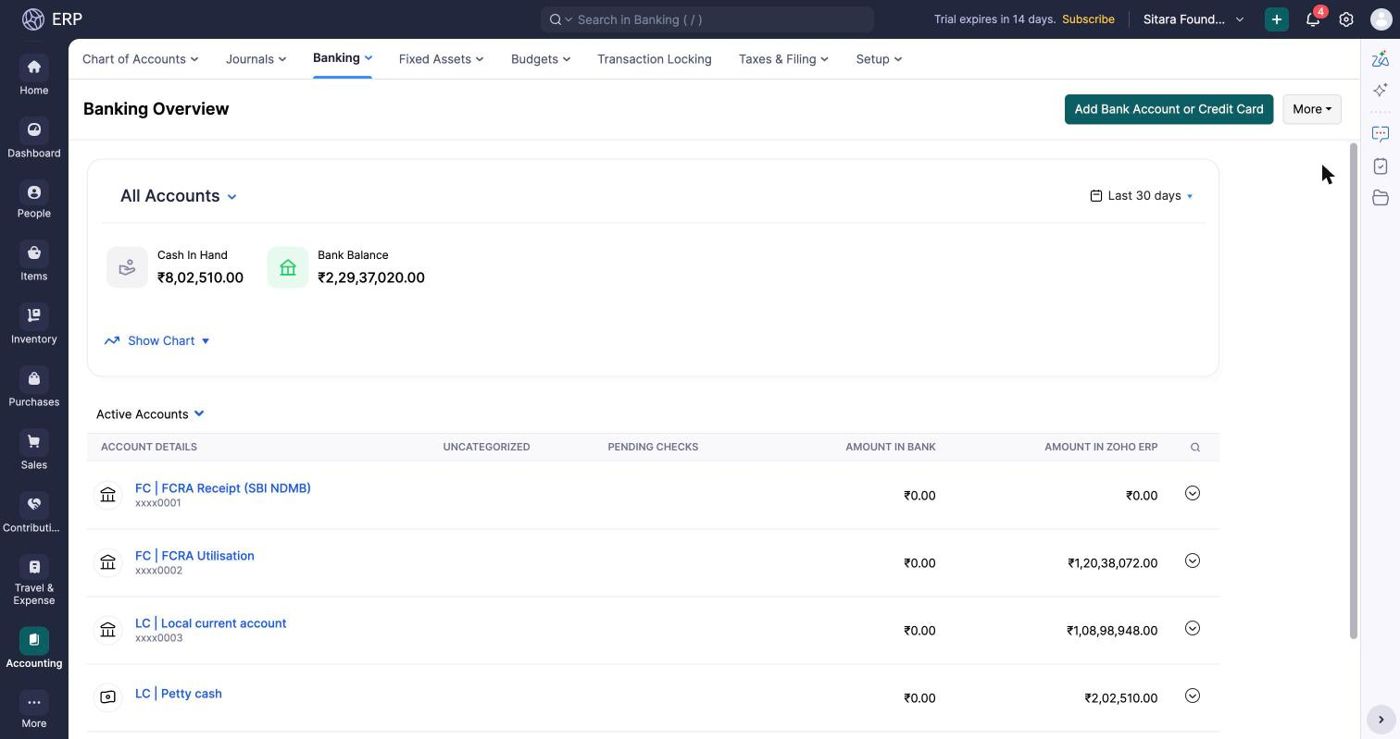 Banking overview. The FC and LC prefixes show up in every bank picker across the product.
It’s a simple trick, but it’s the one that stopped most mistakes in testing. When someone pays a bill or records a donation, the account they choose tells them which side of the line they’re on.
Step 2: Receive a foreign grant tranche
Record the tranche as a donation in Contributions, in the grant’s currency, deposited to the FCRA receipt account. Zoho ERP converts it at the bank rate and books the INR value.
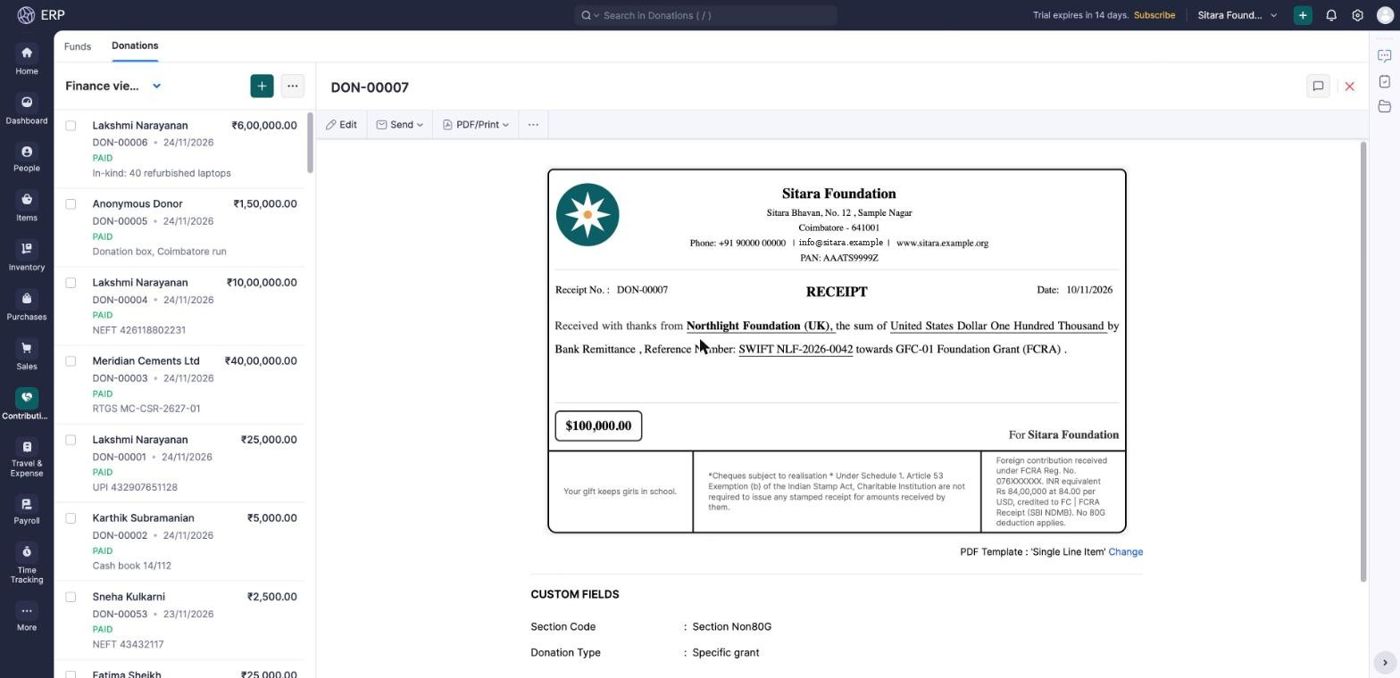 A USD tranche from a UK foundation: posted to the FCRA account, with the INR value and FCRA registration in the notes.
The receipt has no field for your FCRA registration number or the INR value, so we put both in the donation’s notes.
If you import donations through the API, check the exchange rate after every import. In our trial, an import sometimes booked the live rate instead of the one we sent.
Step 3: Move funds to utilisation
Use a bank transfer from FC Receipt to FC Utilisation. Statement import and auto-match worked first time for us, which made the monthly bank reconciliation painless.
Step 4: Put controls where the software doesn’t
This is the gap. A transfer from FC Utilisation to LC Local current account goes through with no warning. Payment rules can’t read the reporting tags on a bill either, so the system can’t tell an FCRA-funded bill from a local one at the point of payment.
Our controls:
- Restrict FC accounts to finance users. Programme staff can’t select them.
- Turn on approvals for every payment from an FCRA account. A second person checks the source of funds.
- Review transfers out of FC accounts every month. One report, one sign-off.
- Tag every FC transaction with its grant. That’s what makes the grant utilisation report work.
Your CA signs off these controls, not the product. Walk them through the setup before go-live.
One side effect to know about: turning on payment approvals means you can no longer pay bills directly from the Banking screen. It’s a small process change.
Reporting on FC funds
Zoho ERP’s Receipts and Payments report covers the whole organisation. There’s no FC-only version, and it counts in-kind gifts as cash. For FCRA reporting we used the grant report (filtered to the FCRA grants) and recommend Zoho Analytics for a proper FC-only statement.
Interest earned on the FCRA account also lands untagged. Tag it to the right grant with a monthly journal.
Limitations we hit
| Limitation | Workaround |
|---|---|
| Gap. Transfers from FCRA to the local account go through with no warning | Restrict FC accounts to finance; monthly transfer review |
| Needs a build. No FC or LC flag; payment rules can’t see bill tags | Approvals on every payment from FCRA accounts |
| Settings. API import can book the live exchange rate instead of the one sent | Check the rate after every FC import |
| Gap. One paying bank per organisation for payroll | Pay FC-funded staff separately |
| Needs a build. Receipts and Payments has no FC-only version | Grant report, or Zoho Analytics |
Next in the guide
Tested on a Zoho ERP trial (India data centre), November 2026, with fictional data. This is a description of software behaviour, not legal advice. Confirm FCRA requirements with your CA.