Zoho Books for Nonprofits: What It Does for Grants, 80G and FCRA (2026)
Your grants sit in a spreadsheet per funder. Donations come in through UPI, cheques and a payment gateway, and someone types each one into the accounts. When a donor asks how their money was spent, finance rebuilds the answer in Excel. Sound familiar?
Zoho Books is often the first system a nonprofit moves to. We wanted to know how far it really goes for an Indian nonprofit, so we set up a demo organisation and ran eight months of its money through it: grants, donations and 80G receipts, FCRA accounts, budgets, approvals and reports. We ran the same organisation through Zoho ERP and Frappe too, so the three guides can be read side by side.
The short answer: Zoho Books is a good ledger for an Indian nonprofit, and a weak fund-management system. It keeps clean books, handles GST, TDS and foreign currency natively, and its reporting tags let you put a grant, programme and cost centre on every line. What it doesn’t do is know it’s working for a nonprofit.
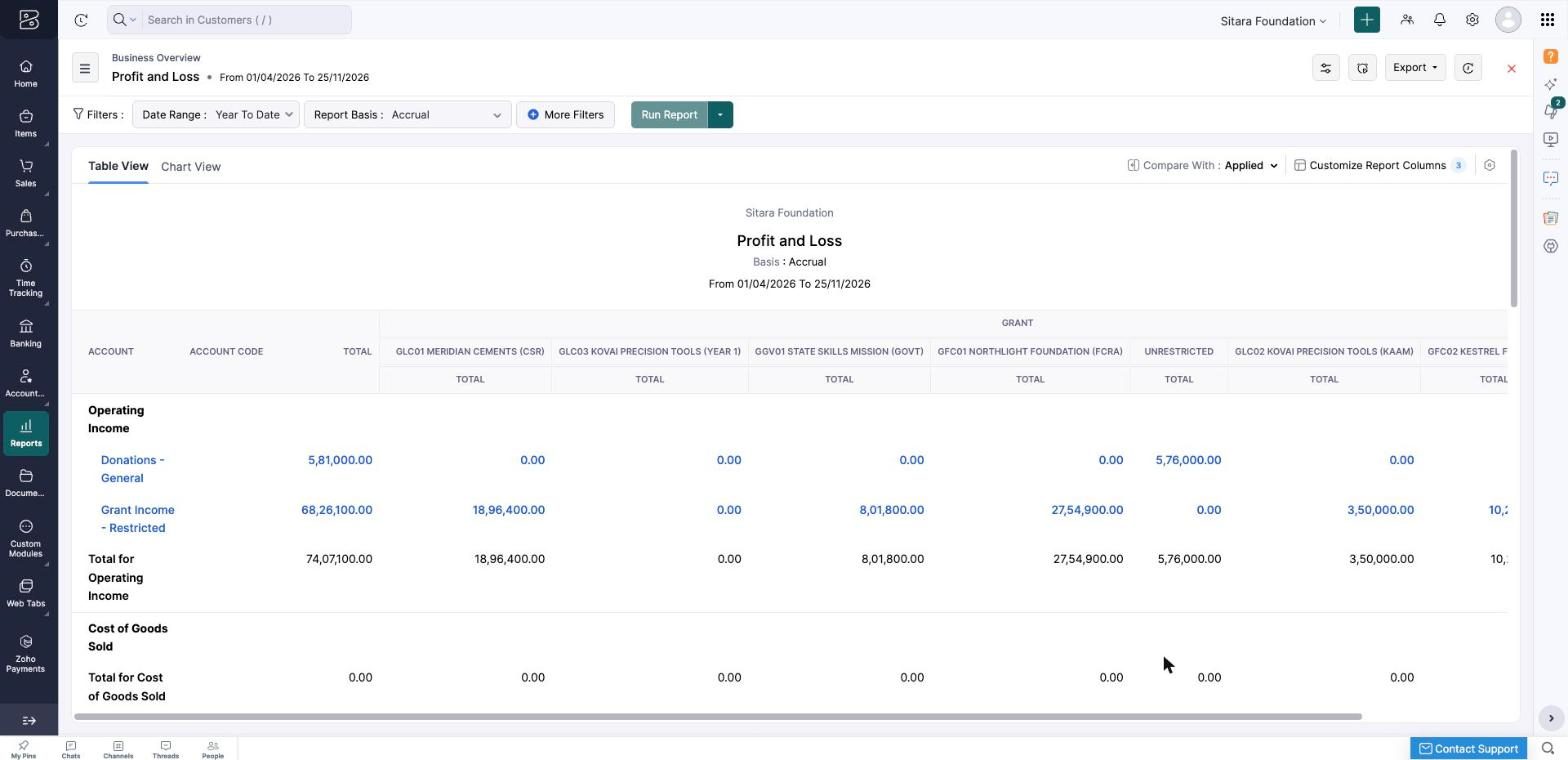 Profit and Loss compared by the Grant tag: the grant-wise income and expenditure statement. Every name and number in this guide is made up.
In this guide
- How we tested
- The scorecard
- Setup and nonprofit language
- Donors, donations and 80G
- Grants and restricted funds
- Spending and approvals
- Budgets and control
- FCRA and compliance
- Reporting
- Extending Zoho Books
- Where Books falls short
- Books or Zoho ERP?
- FAQs
How we tested
We created a demo nonprofit, Sitara Foundation: a public charitable trust in Coimbatore, registered under 12A, 80G and FCRA, with two programmes (girls’ education and women’s livelihoods). It had six restricted grants from foreign, CSR, corporate and government funders, plus unrestricted donations. It’s the same organisation we used for our Zoho ERP and Frappe guides.
We used a Zoho Books organisation on the India data centre with Premium features, Zoho Expense for staff claims, and Zoho’s own tools for custom code. Then we loaded eight months of made-up activity (April to November 2026): five live grants worth ₹1.39 crore, ten tranche requests, 32 donations from 15 donors, about 90 grant-tagged expenses and monthly salary journals.
Every result below was checked in the product, not taken from documentation.
The scorecard
We ran 62 tests and rated each one.
| Rating | Tests | What it means |
|---|---|---|
| Native | 15 | Works out of the box |
| Configurable | 27 | Settings only, no code |
| Custom build | 11 | Needs Deluge (Zoho’s scripting language) or a widget |
| Gap | 9 | No reasonable way inside Books |
So 42 of 62 tests worked out of the box or with settings. Three tests had split ratings (period locking, for example, works for the whole organisation but not for one grant). They’re counted under their first rating.
Setup and nonprofit language
Setting up the organisation took minutes. The real work is shaping Books for a nonprofit.
- Chart of accounts (Configurable). We added 16 accounts: restricted and unrestricted grant income, donations, an unspent grants liability and programme expense heads.
- Reporting tags (Configurable). Four tags (Grant, Programme, Cost Centre and Funding Source) on bills, invoices, journals and banking. This is the single most useful setting for a nonprofit: every line carries its grant, and every report can be split by it.
- Number series and PDFs (Configurable). Invoices became fund requests and Sales Orders became grant agreements, so donors don’t receive a “Tax Invoice”.
- Module names (Gap). You can’t rename Customers, Invoices or Sales Orders. Staff see commercial words in the menus and need a short glossary.
- Users and roles (Configurable, with a gap). Roles are set per module. You can’t let a programme manager see only their own grants, and every user, approvers included, is a paid Books seat.
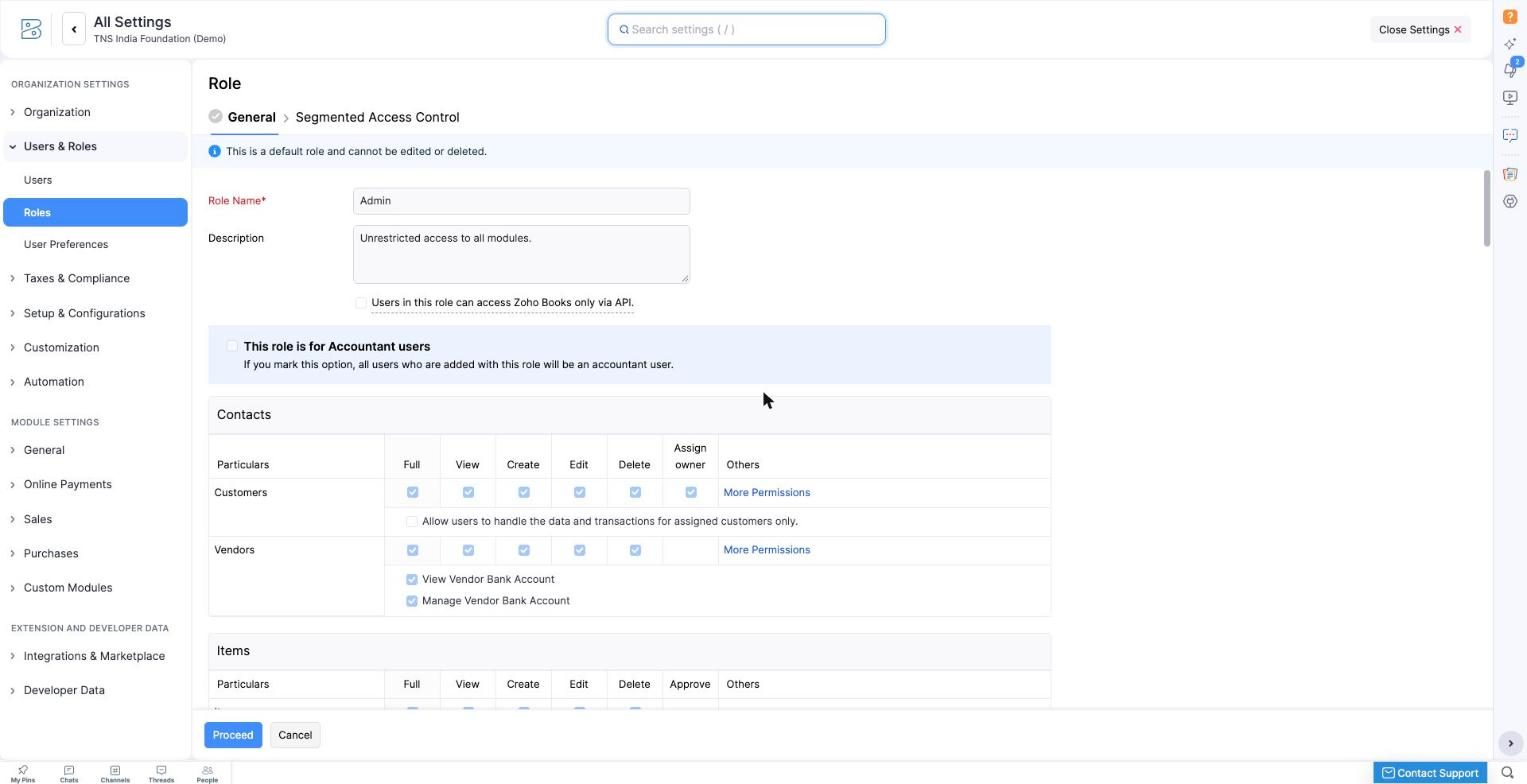 Roles are per module. There’s no grant-level access.
Donors, donations and 80G
Books treats a donor as a customer. Custom fields hold the PAN, CSR registration and a relationship owner.
- One-off donations (Configurable). Books India has no sales receipt, so a donation is an invoice plus a payment, or a payment recorded straight against the donor.
- 80G receipts (Configurable). We retitled the payment receipt template as an 80G receipt and added the donor’s PAN, the 80G registration and the approval wording. It took about 20 minutes.
- Form 113 (formerly 10BD) (Configurable for the data, Gap for the file). Three custom fields on each payment carry what the form asks for: donation nature, receipt type and 80G eligibility. A saved list view becomes the working register. You still prepare the Form 113 file outside Books.
- Donation certificates (Configurable). A copy of the customer statement, retitled in the Form 114 (formerly 10BE) format, puts a donor’s year of gifts on one page. The legal Form 114 still comes from the income tax portal; this is the donor-friendly copy.
- Foreign donations and monthly givers (Native). A dollar donation went into the FCRA bank account with the exchange difference posted automatically. Recurring invoices handle a fixed monthly gift.
- Donor portal (Native). The customer portal shows receipts and statements, and can show a CSR donor their grant agreement.
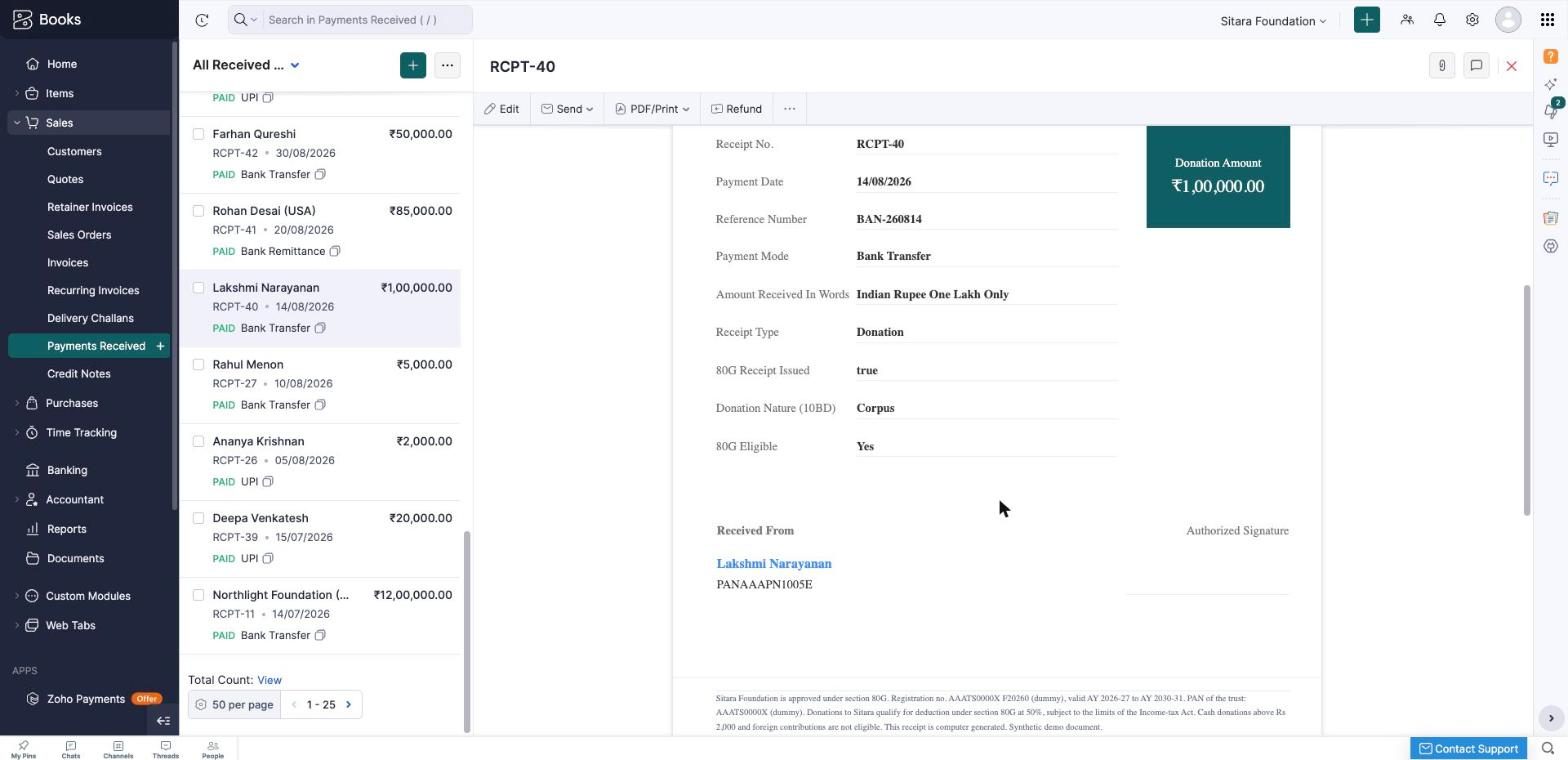 The 80G receipt for a ₹1 lakh corpus gift.
Grants and restricted funds
Books has no grant record. The best fit we found is the Sales Order.
| Grant concept | In Zoho Books |
|---|---|
| Grant agreement | Sales Order with custom fields for grant code, period, indirect cost and utilisation gate |
| Grant stages | Sales Order sub-statuses: Proposal, Sanctioned, Active, Closing, Dropped |
| Tranche schedule | One Sales Order line per tranche |
| Fund request | An invoice raised from one tranche line |
| Receipt | Payment received into an unspent grants liability |
A ₹15 lakh CSR grant in three tranches ran end to end, and Books tracked which tranches had been requested (Native). Two things stay manual. Releasing restricted income as money is spent is a monthly journal. And the grant lives twice, as a Sales Order and as a Grant tag option, so someone has to keep the two in step (Gap).
We also found that once every tranche is requested, Books marks the Sales Order Closed even though the grant runs for months more.
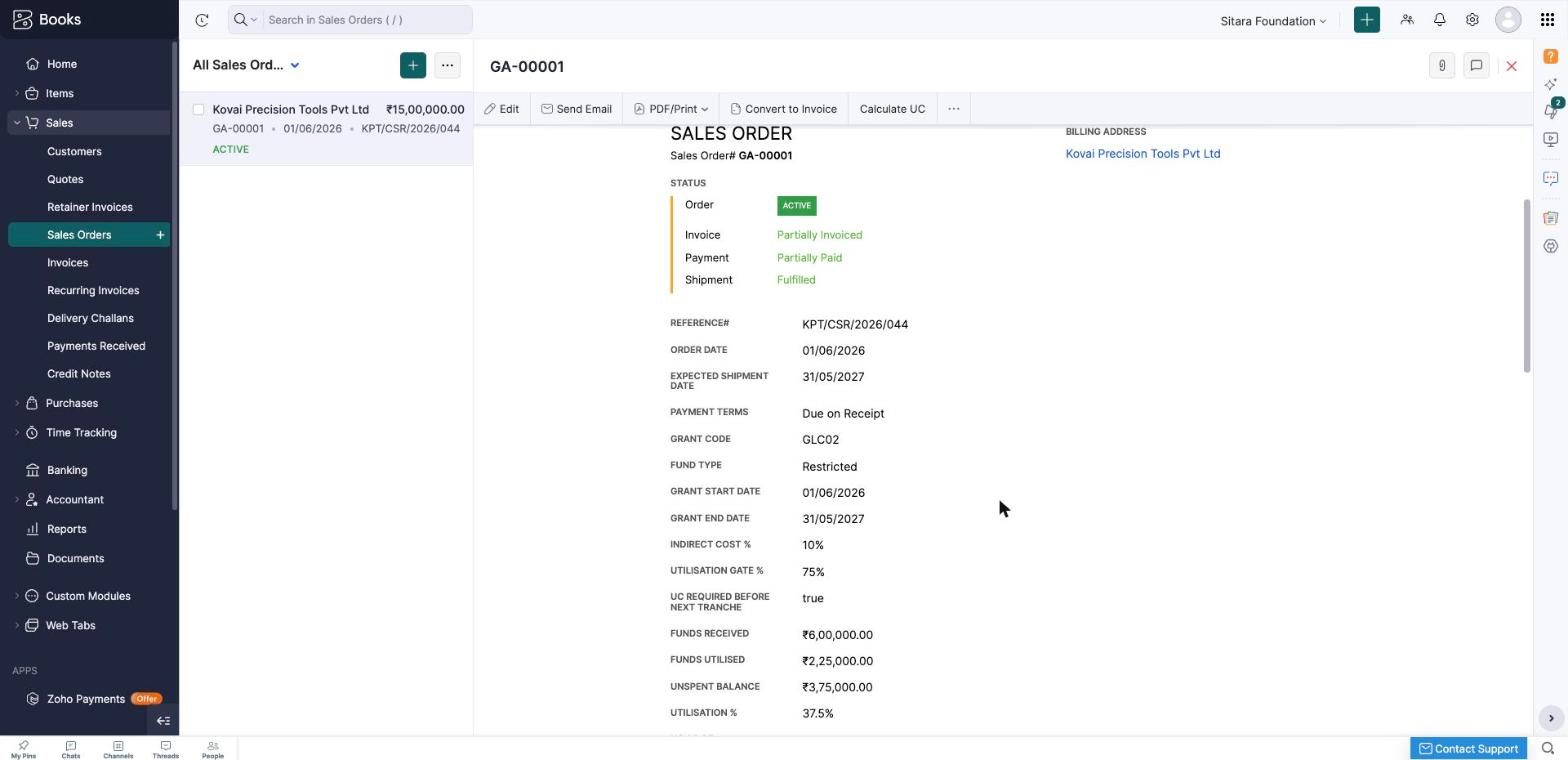 The grant agreement as a Sales Order, with grant fields.
Spending and approvals
Day-to-day spending is where Books is strongest.
- One bill, several grants (Native). Each line carries its own Grant, Programme and Cost Centre tags.
- Purchase order to bill (Native). A custom field records the procurement method, such as three quotations.
- A second approval above your limit (Configurable). A custom approval rule sends larger bills to a second approver.
- Maker-checker (Gap). When an admin submitted a ₹2.25 lakh bill, Books approved it at once. Separation of duties only works if the person entering bills isn’t an admin, which is hard in a small finance team.
- Staff claims (Native). Zoho Expense syncs approved claims into Books.
- Salaries split across grants (Gap). There’s no percentage allocation. Finance posts a journal each month.
- TDS (Native). TDS sections apply on vendor bills.
Budgets and control
- A budget per grant (Configurable). A budget can be scoped to one Grant tag, with an amount per head per month, and the standard report shows budget, actual and variance (Native).
- Grants that cross financial years (Gap). Budgets run April to March, so a grant from June to May needs two budgets and nothing adds them up.
- Budget revisions (Gap). Editing a budget overwrites it. There’s no revision history or donor approval.
- Stopping overspend (Custom build). Books has no block. We built a widget beside the New Bill form that checks what’s left in the head and refuses the save if the bill would go over. It only covers new bills entered in the browser, not edits, imports, the API or the mobile app.
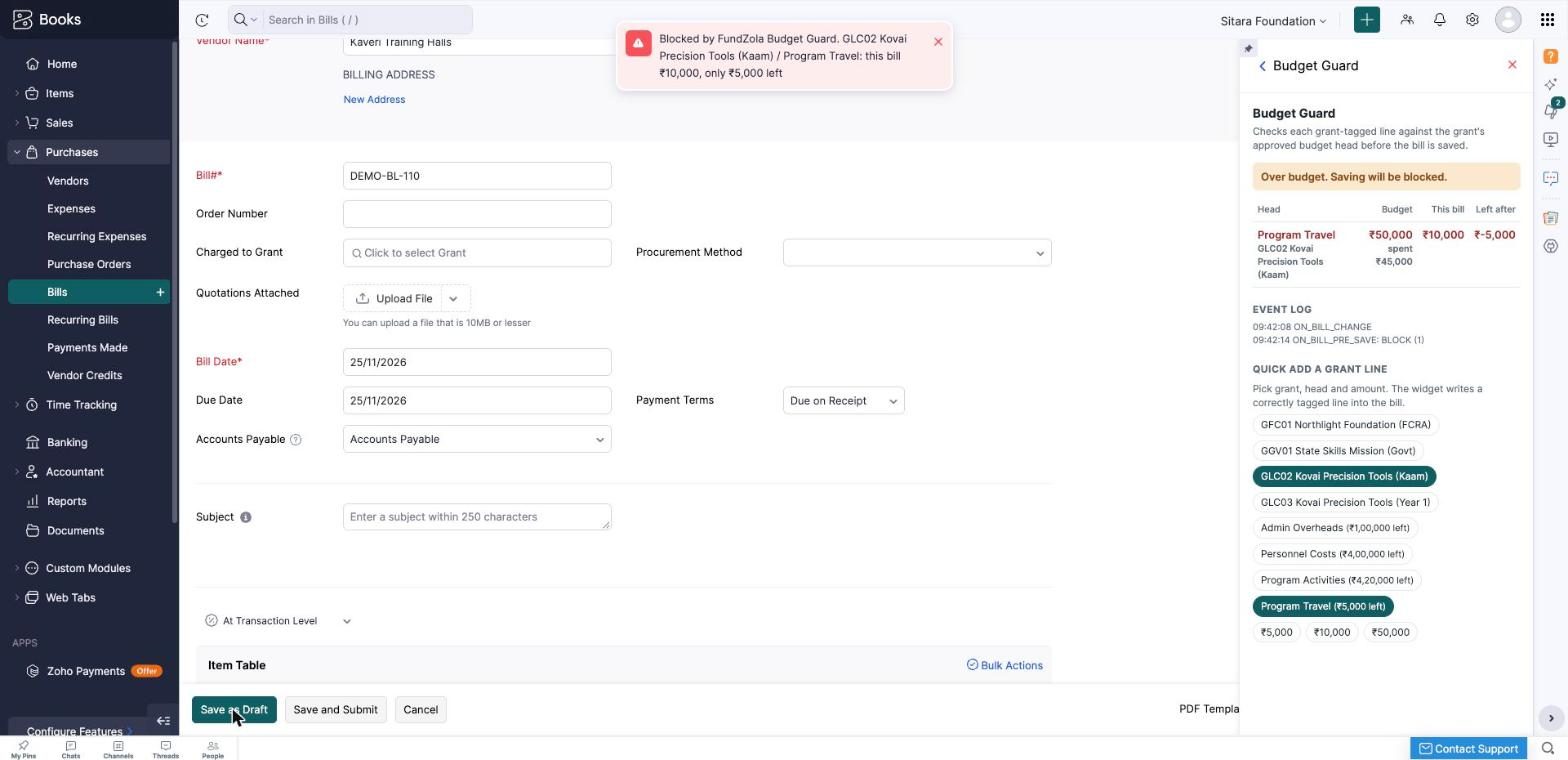 A ₹10,000 travel bill refused, because only ₹5,000 was left in the head.
FCRA and compliance
- FCRA accounts (Configurable). Separate FCRA receipt and utilisation accounts, plus a Funding Source tag, keep foreign money visible.
- FCRA misuse (Gap). We paid an FCRA-tagged bill from the local bank account and Books gave no warning. Segregation depends on staff discipline and a monthly review.
- Utilisation certificates (Custom build). A button on the grant reads the ledger and writes received, utilised and unspent amounts back to it. Nobody types the numbers.
- Tranche gates (Custom build). A second fund request was refused because only 37.5% of the money received had been spent, against a 75% gate.
- Period locking (Native for the organisation, Gap per grant). You can lock a period for everyone, but not one grant after its utilisation certificate.
- Audit trail (Native). Every create, edit and delete, with the user and time.
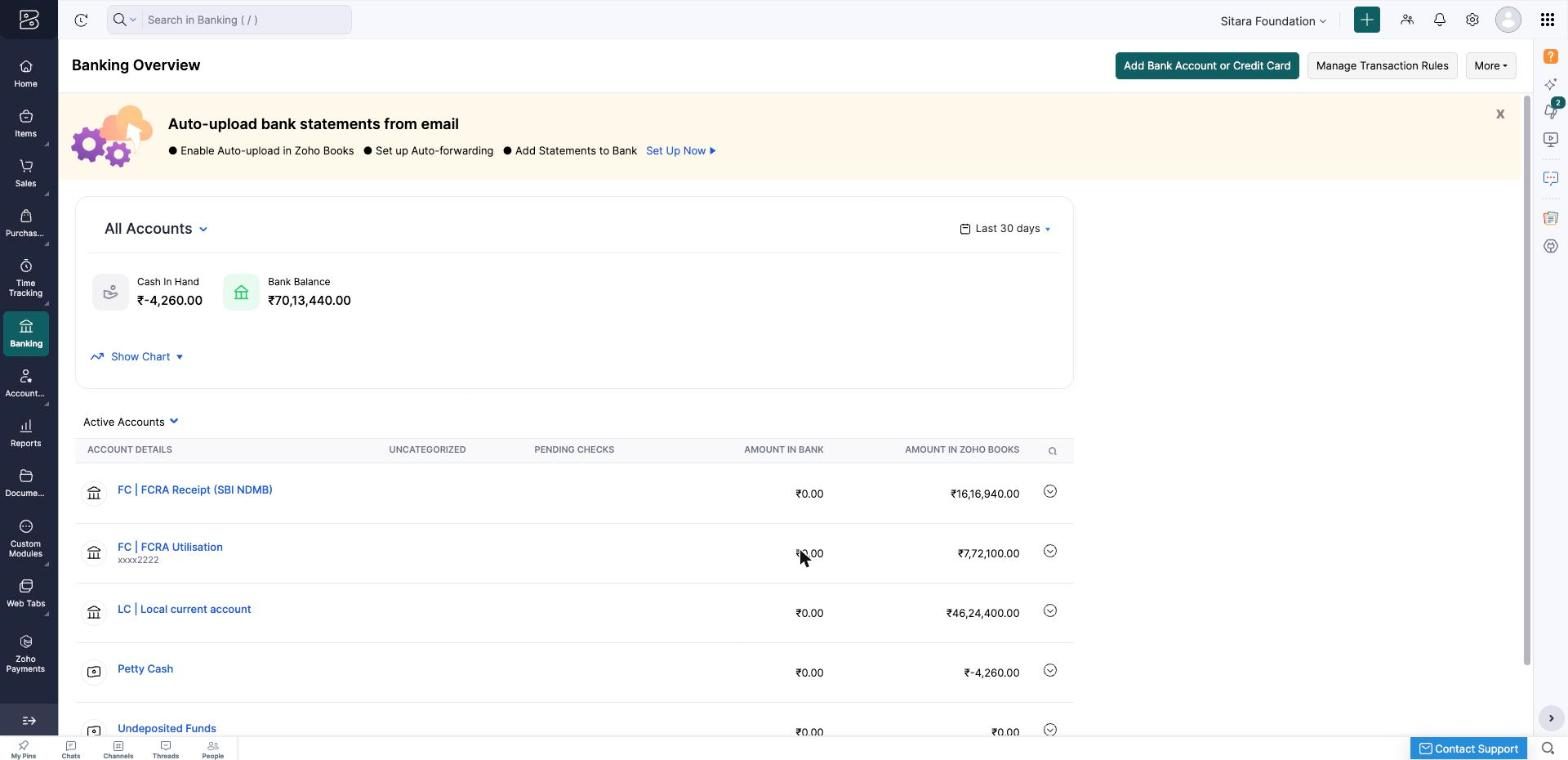 FCRA receipt, FCRA utilisation and local accounts side by side.
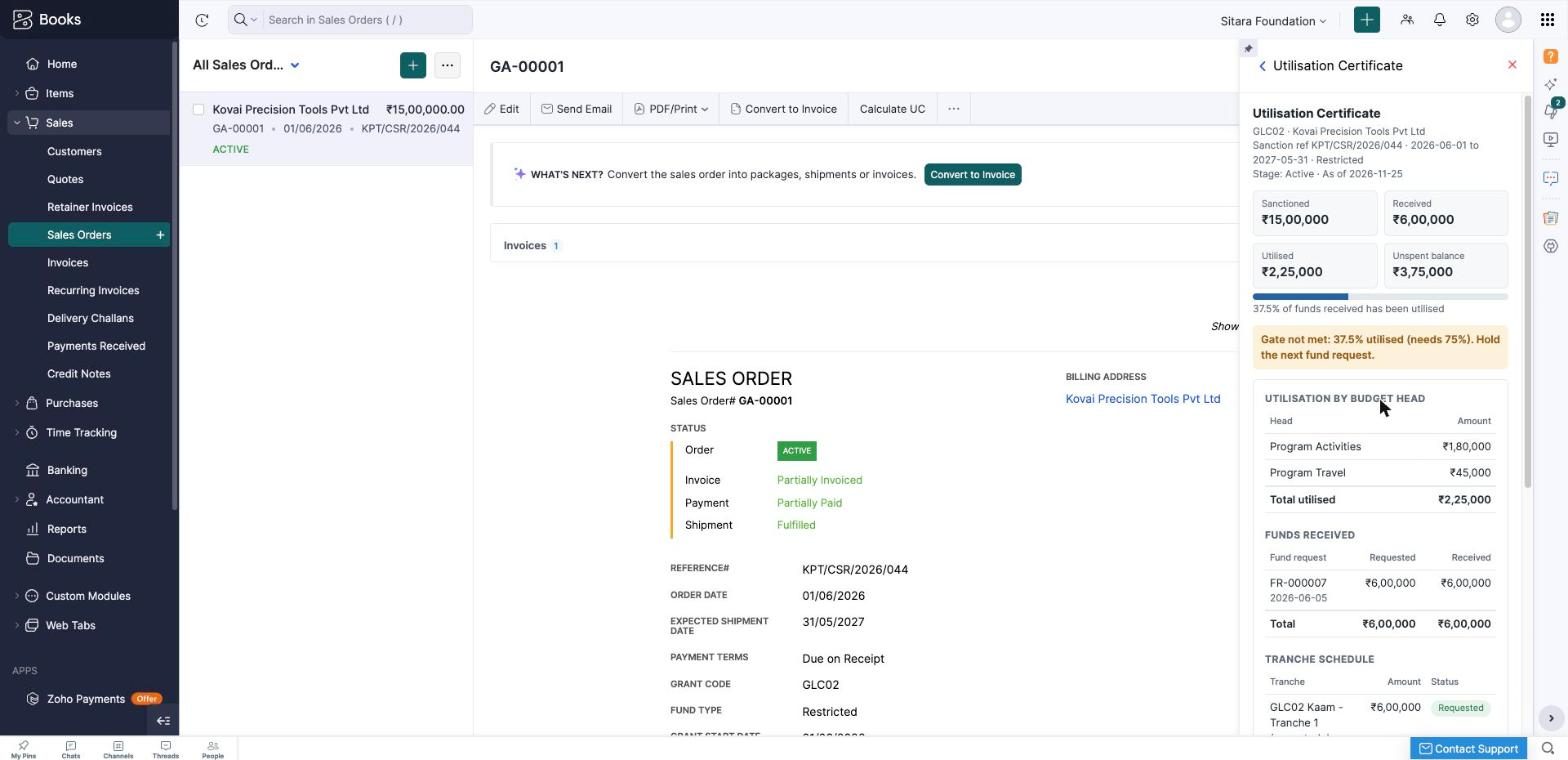 The utilisation certificate, calculated live from the ledger.
Reporting
- Grant-wise income and expenditure (Native). Profit and Loss filtered by one grant, or compared across all grants in columns. Because restricted income is released to match spending, each grant column balances and the unrestricted column shows the real surplus or deficit.
- Nonprofit formats (Gap). There’s no Income and Expenditure or Receipts and Payments format. Auditors’ formats still go through Excel.
- Scheduled reports (Native). The grant-wise report can be emailed monthly.
- A grants view on the dashboard (Custom build). The home dashboard speaks in receivables and payables, so we added a fund position card.
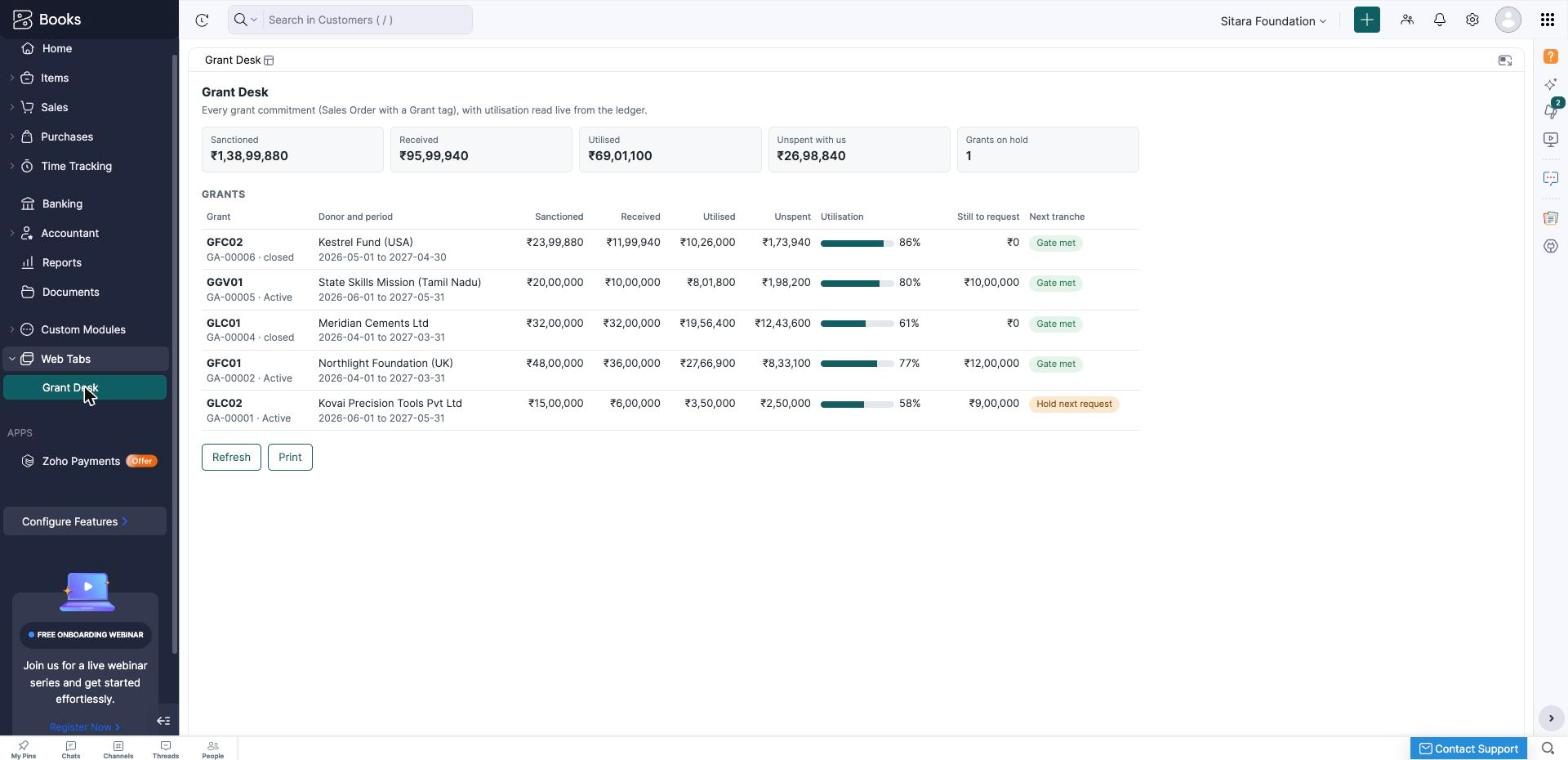 A Grant Desk page we built: one row per grant with live utilisation.
Extending Zoho Books
This is where Books earns its place. Custom fields, custom modules, workflow rules, Deluge buttons and schedules, and JavaScript widgets all worked in our test organisation.
The finding that matters most: a widget in a New Bill or New Invoice form can check the ledger and refuse the save. Validation rules can only look at the record in front of them, so they can’t see a budget or a grant balance. Widgets can. That turns “shown” into “enforced” for budget heads and tranche gates, within the limits above.
The catch is that every one of these pieces has to be built, tested and maintained. That’s fine for one or two controls. Past that, you’re building a grants system inside an accounting app.
Where Books falls short
| Limitation | Workaround |
|---|---|
| Commercial names on menus and fields | Rename number series and PDFs; a short staff glossary |
| No grant-level access for programme staff | Share reports, or give staff a separate front end |
| Every approver is a paid Books seat | Approvals in Zoho Expense or a separate app that posts to Books |
| No Form 113 file | Export payments with PAN and format in Excel |
| Grant held as a Sales Order and a tag | A checklist when a grant is signed, or a small script |
| Restricted income released by hand | A monthly journal from a template |
| Admin’s own bill auto-approved | Keep entry and approval with different non-admin users |
| No salary split by grant | A monthly allocation journal |
| Budgets per financial year only | Two budgets per grant, joined in a report |
| No budget revision history | A custom module with approval |
| No block on overspend | A widget guard, plus an after-save check for edits and imports |
| FCRA bill payable from the local account | Restrict FCRA accounts to finance, and a monthly review |
| No Income and Expenditure format | Reshape the Profit and Loss export |
Books or Zoho ERP?
Zoho ERP runs on the same engine as Books, and much of it looks the same. The differences are at the edges.
- Zoho ERP is ahead on the nonprofit front office: a donations and funds module, a statutory 80G receipt, a Form 113 report, and payroll, procurement and expenses in the same product.
- Books is ahead on simplicity and on the tested route for custom controls. Its receipt templates are fully editable, and it connects to the rest of Zoho One so you add only what you need.
- Both leave FCRA rules, budget blocking, grant-level staff access and multi-year budgets to you.
| Your organisation | Better fit |
|---|---|
| Small nonprofit, a few CSR or foundation grants, a CA handles compliance | Zoho Books |
| Many individual donors, 80G receipts and Form 113 at volume | Zoho ERP |
| 50+ staff, wants payroll, procurement and expenses in one product | Zoho ERP |
| Multi-donor or FCRA-heavy, with programme staff who raise and approve spending | Books or ERP, with a grant layer on top |
The full side-by-side, with Frappe, is in our comparison of Zoho Books, Zoho ERP and Frappe for nonprofits. Check current Zoho pricing for your user count before deciding; seat cost often settles it.
Need grant controls on top?
Once programme staff need to raise and approve spending, or funders insist on per-grant controls, you’re past what Books does alone. That’s why we built FundZola: grants, budgets, approvals, FCRA rules and donor reports in one app, with every approved entry posted to Zoho Books, which stays your accounting record. Compare the setups to see which one fits.
FAQs
Can Zoho Books issue 80G receipts?
Not as a built-in feature. You can retitle the payment receipt template as an 80G receipt and add the donor’s PAN and your 80G registration through custom fields. It took us about 20 minutes. Zoho ERP’s nonprofit edition has a statutory 80G layout built in.
How do you track grants in Zoho Books?
With reporting tags. Put a Grant, Programme and Cost Centre tag on every transaction line, then compare Profit and Loss by the Grant tag. That gives one column per grant. A Sales Order can stand in for the grant agreement and its tranche schedule.
Does Zoho Books stop spending above a grant budget?
No. Budgets show budget against actuals but don’t block a bill. We built a widget that refuses the save when a bill would overspend a head, but it only covers new bills entered in the browser.
Should a nonprofit choose Zoho Books or Zoho ERP?
Zoho Books suits a small nonprofit with a handful of grants and a finance team of one to three. Zoho ERP suits organisations with many individual donors, or that want payroll, procurement and expenses in one product.
Tested by EdZola on a Zoho Books organisation (India data centre) in November 2026, using a made-up organisation. Every name, PAN and amount is invented. Zoho updates Books often; check current behaviour before relying on any finding.