
I Connected Claude to Zoho Mail. What We Found Went Beyond Email.
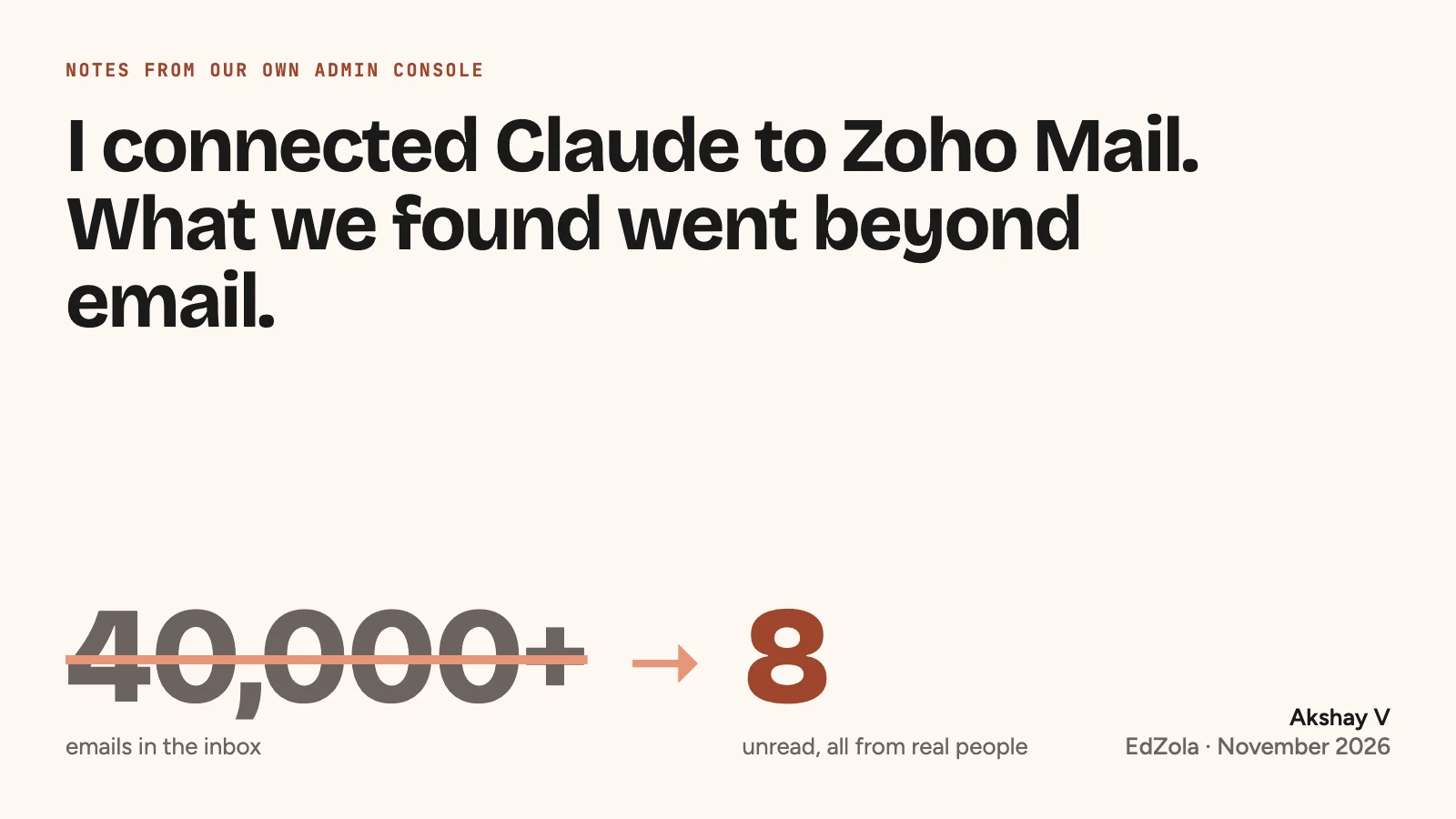
I had over 40,000 emails in my inbox.
Newsletters I never read. Notifications from tools we’d stopped using. Automated reports, community updates, old project threads. And somewhere in between, actual conversations with people I needed to reply to.
Sound familiar?
Three days later I had eight unread emails left. All from real people.
That’s not the interesting part, though. What started as an inbox clean-up turned into something much bigger. We found old accounts that hadn’t been properly offboarded, security settings we’d never switched on, software we were paying for twice, and someone pretending to be me.
Most of it we found by working alongside an AI agent. Here’s how it happened, what went wrong, and why I think every small organisation should look at its own setup this way.
Set up once, forgotten for six years
I started EdZola in 2020. Like most small organisations, we set up email, created accounts for the team, configured a few basics and moved on.
Then we grew. People joined and left. We signed up for more tools, joined professional networks, took on new projects and became a Zoho partner ourselves. Every project added a folder. Every tool added a notification. When someone left, we handled the immediate handover, but we didn’t always go back and check every account, group membership and permission they had.
Six years of that adds up.
The irony isn’t lost on me. We spend our days helping nonprofits build better systems on Zoho. Our own internal setup needed the same attention we give everyone else’s. I suspect that’s true of a lot more organisations than would admit it.
Claude, Zoho MCP and a different way of working
I’d been experimenting with Claude, especially its ability to work directly inside applications through something called MCP.
MCP stands for Model Context Protocol. Think of it as a bridge between an AI assistant and the tools you already use.
Ask a normal AI assistant to help organise your email and you get instructions: create these folders, set up these filters, check these settings. You still do the clicking.
With MCP, the assistant can connect to the application, read what’s there and, where you’ve allowed it, make the change itself. Instead of telling you how to create 20 filters, it can create them.
Zoho has an official MCP server for Zoho Mail, with tools for emails, folders, users and admin settings. I connected it to Claude and used Claude’s desktop app to investigate and organise our setup.
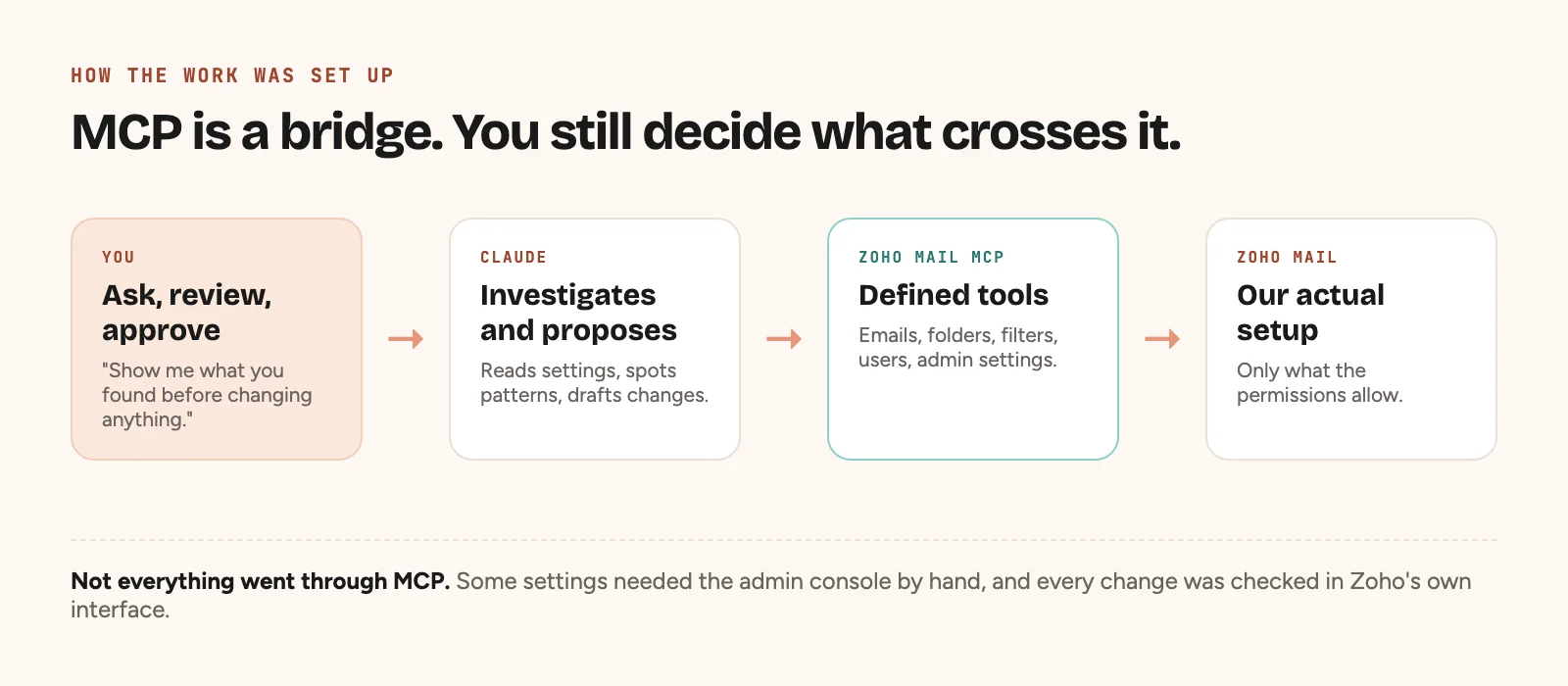
Not everything went through MCP. Some settings needed the admin console by hand, and some actions needed checking manually. That matters. An AI agent is only as capable as the tools, permissions and interfaces you give it.
Still, it changed the shape of the work. Instead of days clicking through screens, I could describe what I wanted, ask what already existed, and review what was being proposed.
We started with my inbox. We ended up auditing most of our admin setup.
Finding 1: My inbox didn’t have a spam problem
My first assumption was that we were getting too much spam. The numbers said otherwise. Zoho’s spam protection was already catching plenty.
The real problem was perfectly legitimate email that didn’t need me. Automated reports, newsletters, software notifications, community lists, promotions and system alerts, all sitting next to real conversations as if they deserved the same attention.
They don’t. So we rebuilt the inbox around one question.
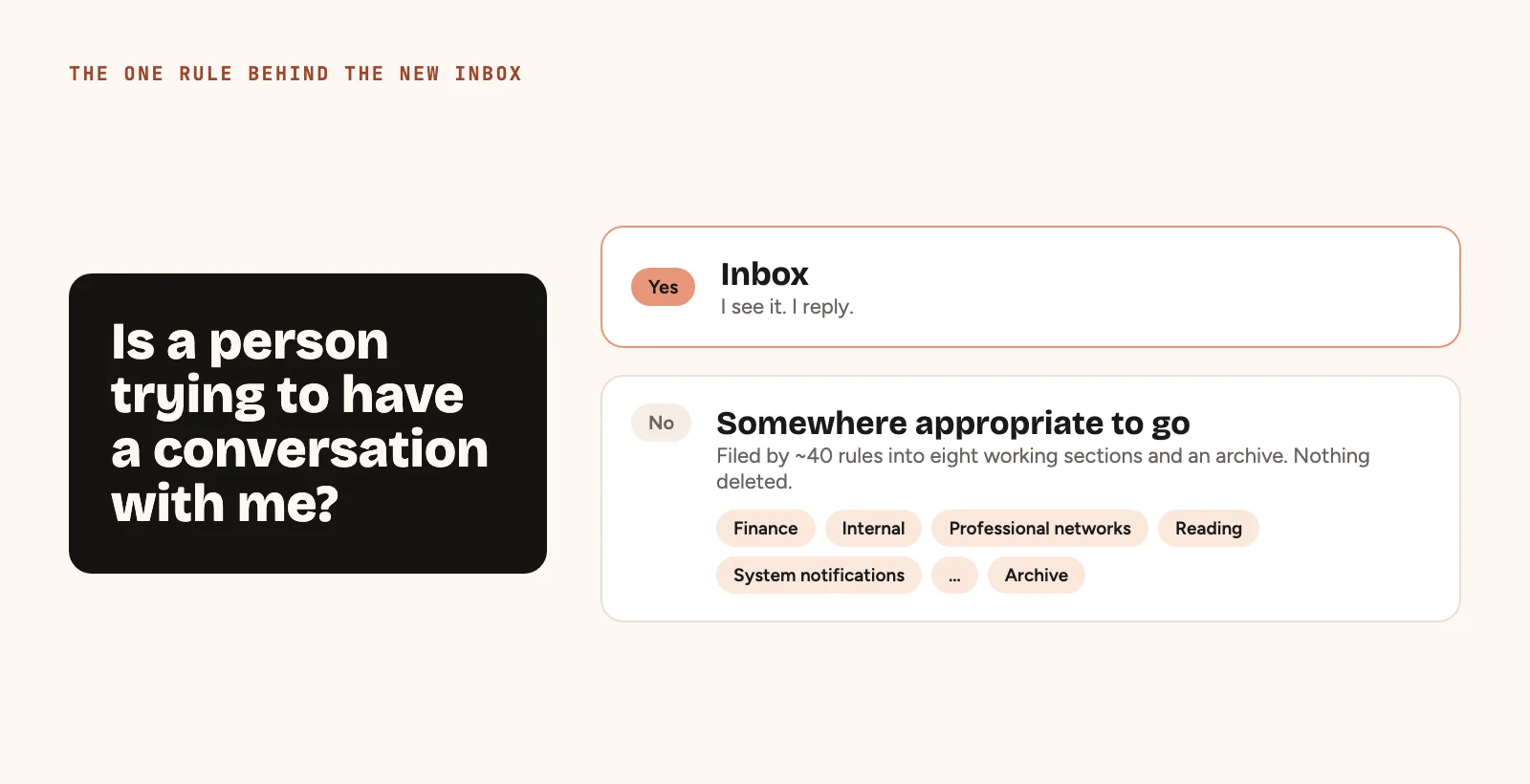
If a person is trying to have a conversation with me, I should see it. Everything else needs somewhere sensible to go.
We set up a smaller, consistent folder structure for finance, internal communication, professional networks, reading and system notifications. We retired old filters and created roughly 40 new rules to sort incoming mail automatically. Then we filed old messages without deleting them.
To be clear about the numbers: going from 40,000+ to eight unread doesn’t mean 40,000 emails were deleted. Older messages were kept and organised. Unread markers that didn’t mean anything were cleared.
Sometimes productivity has nothing to do with better tools. It’s deciding what deserves your attention.
Finding 2: Former team members still had access
This was the moment I realised we had to look beyond email.
Over six years, plenty of people have worked with EdZola in different roles. When they left, we disabled their email. But disabling someone’s mailbox isn’t the same as deactivating their organisational account. In some cases, former team members still had active Zoho identities.
It’s an easy thing to miss. Turning off a person’s email doesn’t necessarily revoke their other application permissions, sessions or connected services.
We reviewed every one of these accounts, deactivated the ones we no longer needed, and cleaned up old group memberships and admin privileges. Nothing suggested anyone had misused their access. But unnecessary access is still a risk.
For a small organisation, offboarding usually means collecting the laptop, transferring files and switching off email. It should also mean checking every system that person could get into.
Finding 3: Someone was pretending to be me
This one was uncomfortable.
A colleague got an email that looked like it came from me. It didn’t. Someone had created an account on a public email service, set my name as the display name, and asked my colleague for their phone number.
That’s display name spoofing. It’s different from someone forging an address on your own domain, and it doesn’t need anyone to hack anything. The scammer just counts on you recognising the name and not checking the address.
What surprised me was that Zoho already had a fix. Under phishing and malware protection, admins can list trusted display names with their authorised addresses. Mail using those names from any other address can be flagged or quarantined for review.
We extended that protection to the key people in the organisation. It won’t stop every kind of impersonation, but it’s one more safeguard. And it was sitting there the whole time. We just hadn’t switched it on.
Finding 4: Security controls we had but hadn’t configured
Once we were inside the admin console properly, more came up:
- Multi-factor authentication, the second check when someone signs in
- Password and session security
- Suspicious sign-in monitoring
- Shared accounts and admin permissions
- Email authentication policies
- Organisation-wide warnings on external email
We also went through unusual sign-in activity, including attempts from outside the places we normally work. An unusual attempt doesn’t mean an account is compromised. But an admin should be able to spot it and look into it.
The most interesting find was our DMARC policy. DMARC helps receiving mail servers spot messages that falsely claim to come from your domain. Ours was set to monitor, not enforce. In technical terms, p=none.
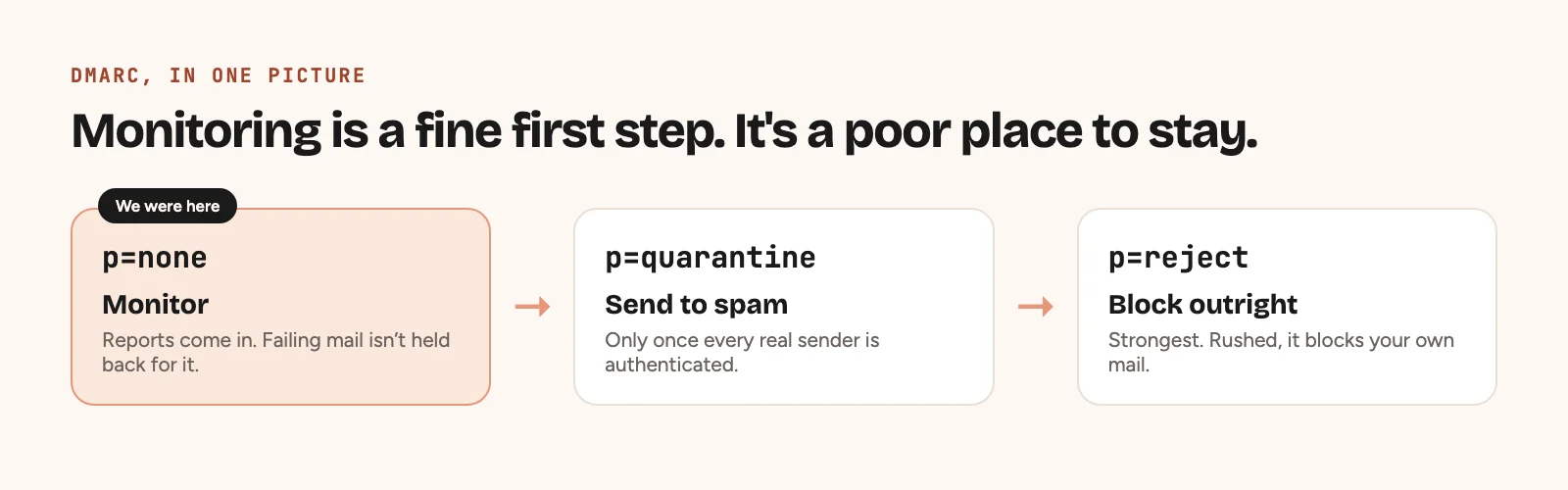
That isn’t a misconfiguration. Monitoring is usually the right place to start. But staying there forever means you never ask other mail servers to quarantine or reject mail that fails the check.
Moving to enforcement needs care. Every legitimate service that sends mail for you has to be authenticated first, or you’ll block your own messages. So we’ve made it a phased improvement rather than flipping everything at once.
Zoho didn’t lack security features. Having a feature and actually using it are two different things.
If you hold beneficiary or donor data, this connects directly to your obligations under India’s DPDP Act. We wrote about that side of it in ZolaShield, our DPDP compliance work for nonprofits, and more broadly in navigating privacy and cybersecurity in nonprofit operations.
Finding 5: We were paying for things we didn’t need
Security wasn’t the only surprise. We found old account arrangements, overlapping licences, and one app subscription we could probably fold into our existing Zoho setup.
Together that’s close to ₹50,000 a year in possible savings. Not life-changing. But for a small, bootstrapped organisation, recurring costs add up. And these weren’t costs we’d ever decided to keep paying. They just piled up while nobody was looking.
If you’re on Zoho One, it’s worth checking the same thing. Our Zoho One for nonprofits guide covers how the licences fit together.
The AI made a mistake too
I want to be honest about this part, because it’s the most important.
While reorganising, we moved some finance email without fully checking how those folders were shared. A colleague temporarily lost access to information they’d always been able to see. We caught it, fixed it and changed how we worked.
It was a good reminder that an AI agent can carry out an instruction correctly and still cause something you didn’t intend.
Moving email sounds harmless. Unless the folder is shared with your finance team.
Disabling an old account sounds sensible. Unless that account owns an app or a key integration.
Tightening a security policy sounds like progress. Unless it stops a legitimate system from sending mail.
So I wouldn’t hand an AI agent unrestricted admin access and ask it to tidy up. We worked to three rules.
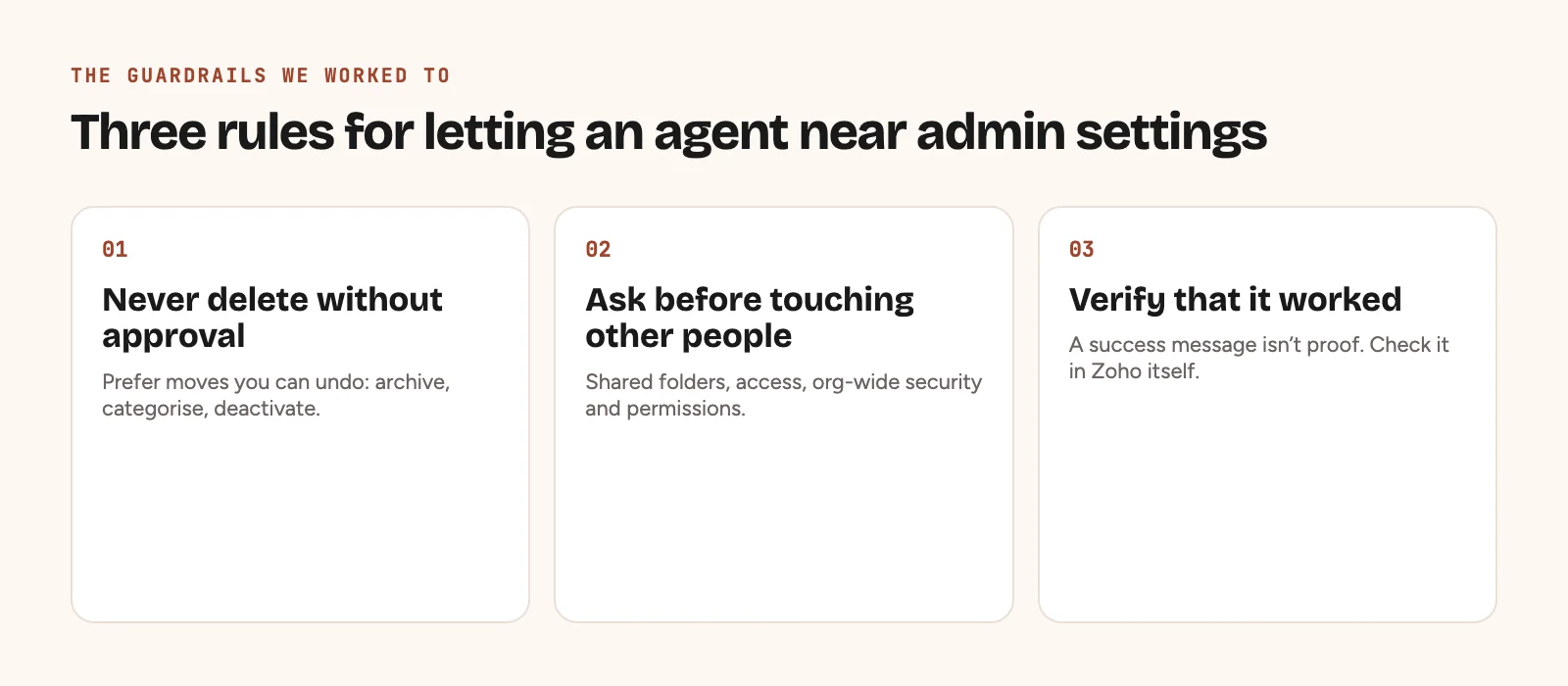
- Never delete data without explicit approval. Prefer things you can undo: archive, categorise, deactivate.
- Ask before changing anything that affects other people. Shared folders, account access, organisation-wide security settings, permissions.
- Verify that every change worked. A success message from an API isn’t proof.
The third rule turned out to matter most. Some filters saved without error and then didn’t behave as expected. We had to open them in Zoho, work out why and fix the configuration.
AI lets you move much faster. That makes checking more important, not less.
Three days later
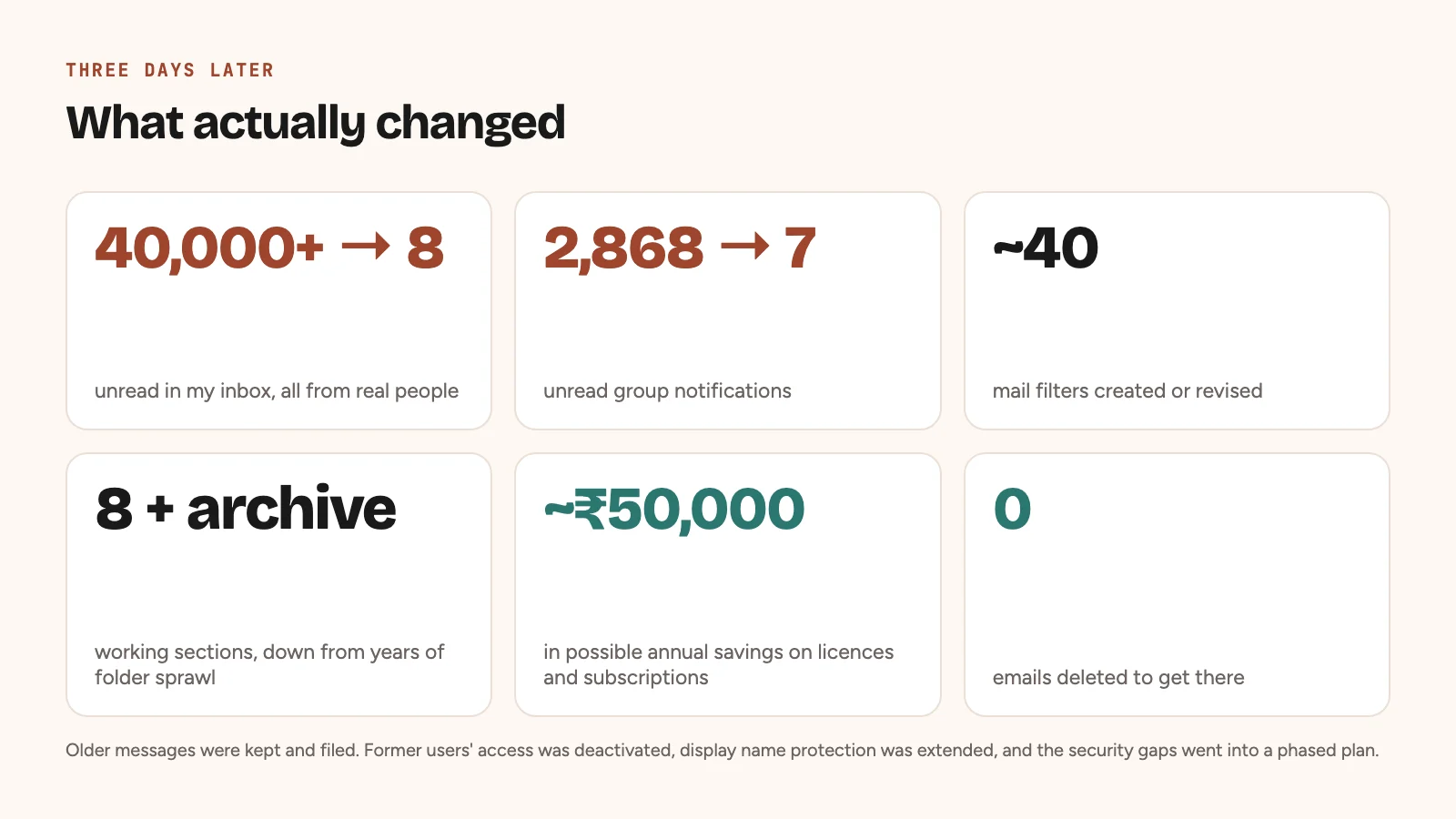
| Area | What changed |
|---|---|
| Inbox | 40,000+ messages organised and filtered; eight unread left |
| Folders | Consolidated into eight working sections and an archive |
| Mail filters | Around 40 rules created or revised |
| Group notifications | Unread count down from 2,868 to seven |
| Former users | Unneeded organisational access found and deactivated |
| Impersonation | Display name protection extended to key people |
| Security | Gaps documented, with a phased improvement plan |
| Subscriptions | Close to ₹50,000 in possible annual savings found |
| Data deletion | No email deleted for the clean-up |
The numbers are satisfying. What matters more is that we now actually understand how our own systems are configured, and what still needs work.
Ten things every Zoho admin should check
You don’t need AI for any of these. But if you look after Zoho Mail or Zoho One for your organisation, this is a good place to start.
1. Review every active user. Not just mailboxes. Organisational accounts, group memberships, app access and admin roles. Make sure former staff and contractors are properly offboarded.
2. Enforce multi-factor authentication. Start with admins and other high-privilege accounts, then the whole organisation. Check how service accounts, integrations and recovery methods will be affected first.
3. Review shared accounts. Give people individual access wherever you can. Where a credential genuinely has to be shared, keep it in an access-controlled password manager such as Zoho Vault.
4. Check for unusual sign-ins. Review login activity and turn on suspicious-login alerts. Watch for unfamiliar devices, countries and odd patterns.
5. Turn on display name spoofing protection. Protect the names people are most likely to fake: founders, finance leads, senior managers. Check the quarantine regularly so real mail isn’t lost.
6. Consider warning banners on external email. Zoho Mail can flag messages that come from outside the organisation.
7. Review SPF, DKIM and DMARC. These let other mail servers check whether mail claiming to be from your domain is genuine. Read your DMARC reports and list every sending service before you tighten enforcement.
8. Audit filters and forwarding rules. Look for outdated rules, unexpected forwarding addresses and rules that don’t do what they say. Test new filters on real messages.
9. Check folder sharing before moving mail. A personal clean-up can hit colleagues if shared folders are involved. Check access before and after.
10. Review licences and subscriptions. Look for unused accounts, duplicate subscriptions and apps you could consolidate. A security audit can turn up savings too.
None of this fixes every security problem. But it surfaces risks and waste that are otherwise very easy to miss.
Would I recommend an AI agent for this?
Yes, with conditions.
What impressed me wasn’t that Claude could move emails or create filters. Automation tools have done that for years. What felt different was being able to explore the problem in conversation. I could ask:
- “Which accounts haven’t been used in a long time?”
- “What security settings should we review?”
- “Which notifications make the most noise?”
- “What could go wrong if we change this setting?”
- “Show me what you found before making any changes.”
Instead of following a fixed workflow, we investigated, learnt and decided the next step together.
That changes what a founder or admin needs to be good at. You don’t need to know every menu and setting in advance. You do need to know the outcome you want, which risks are acceptable, and where a human has to approve.
The skill is shifting from knowing how to do every action to knowing how to supervise something that can do the actions. And that supervision only means something if you understand what access you’ve granted, how your data is handled and what the AI can actually do. For sensitive organisational data, answer those questions before you connect anything.
We’ve written more about this in AI agents for nonprofits: uses, limits and safeguards, and about getting started in Claude for nonprofits.
What this made me think about
At EdZola we help organisations digitise processes, improve their data systems and, more and more, adopt AI. This reinforced something I wrote about how we think about AI: it amplifies the habits you already have.
The next wave of AI adoption may not mean building anything new. It might just mean making proper use of the tools you already pay for. Most organisations have years of software, processes, permissions, data and workarounds that nobody has ever reviewed properly. AI agents could make that review far easier, especially for small teams with no dedicated IT admin.
There’s a catch, though.
The easier it gets for AI to change systems, the more important it is to design systems that are safe to change.
Permissions, approvals, audit trails and the ability to undo are no longer admin details. They’re becoming essential to working with AI at all.
We’re still learning this ourselves. There are more security improvements to finish, accounts to consolidate and processes to write down. But I’m glad we started, because a fairly ordinary inbox clean-up exposed six years of things we’d been too busy to notice.
Frequently asked questions
Can Claude connect directly to Zoho Mail?
Yes. Zoho provides an official Zoho Mail MCP server that works with MCP-compatible assistants, including Claude. What it can do depends on the tools you configure, your permissions and the AI client you use.
What is Zoho MCP?
Zoho MCP uses the Model Context Protocol to let compatible AI assistants work with Zoho applications through defined tools. Depending on the permissions granted, an assistant can read information or take actions such as managing emails and folders.
Is it safe to give an AI agent access to Zoho Mail?
It can be, with safeguards, but no connection is risk-free. Grant the minimum permissions needed, read the AI provider’s data handling terms, avoid exposing sensitive messages unnecessarily, and require human approval for high-impact actions.
Can AI audit the Zoho Mail admin console?
AI can help examine and manage settings that Zoho’s MCP tools and APIs expose. Some settings still need manual checks in the admin interface. Admin-level actions need admin privileges.
Can Claude clean up thousands of emails without deleting them?
Yes, depending on the connected tools and your account permissions. An assistant can help build and run a workflow that classifies, moves, archives and marks messages as read without deleting them. Test it on a small batch first.
Does deactivating a Zoho Mail account remove someone’s Zoho One access?
Not necessarily. Disabling the mail service is different from deactivating the underlying organisational user. Review the person’s access across Zoho One and any connected external apps.
What does DMARC p=none mean?
Your DMARC policy is set to monitor, not to ask for quarantine or rejection of mail that fails authentication. It’s a common starting point. Review your reports and move to phased enforcement once every legitimate sending service is set up correctly.
Can Zoho Mail stop someone impersonating a CEO?
Zoho Mail’s display name spoofing protection can flag or quarantine messages that use a protected name from an unauthorised address. It reduces one kind of impersonation risk. It doesn’t stop every phishing attempt.
Do I need to know how to code to use Zoho MCP?
No. Zoho’s official MCP setup can be configured without writing an application, though the steps and features vary by AI client. Understanding admin settings and managing permissions carefully still matters.
A final thought
We’ve spent six years helping organisations make better use of technology. This was a reminder to ask our own systems the same questions.
What have we stopped paying attention to? What are we still doing by hand because we always have? And what becomes possible when AI can work with the tools we already use?
If you’re a nonprofit, social enterprise or small business on Zoho and you haven’t looked at your admin setup in a while, this is a good place to start. And if you’d like a second pair of eyes, we’d be happy to compare notes.
Akshay