



Zoho One for nonprofits: architecture, pricing and implementation guide (2026)
Zoho One is Zoho’s single licence for its whole suite of 50+ business apps, including CRM, Creator, Books, People, Payroll, Forms, Campaigns, Analytics, Desk, Sign and WorkDrive. For a nonprofit, it usually pays off once three or more teams (fundraising, programmes, finance, HR) need connected systems. If you only need one or two apps, buying them separately is usually cheaper. On 7 November 2026, zoho.com’s pricing page showed India prices of ₹1,250 per employee per month for all-employee licensing and ₹3,500 per user per month for flexible users, both billed annually. Registered nonprofits can also apply for Zoho for Nonprofits wallet credits, which pay up to half of each bill.
- Not sure which Zoho apps you need? Our Zoho for nonprofits implementation guide covers product selection, credits and setup.
- Programme data, beneficiaries, field forms: Zoho Creator for nonprofit MIS
- Donors, funders and grant pipelines: Zoho CRM for nonprofit fundraising
- Everything on one licence: read on. This page covers Zoho One architecture, pricing and rollout.
- Zoho One is a licence, not a system. You still need to decide which app owns each record (donors in CRM, programme data in Creator, money in Books, staff in People). Otherwise you just pay for silos in bulk.
- Pick the licence model with arithmetic. All-employee pricing charges for everyone on payroll, including field staff who never log in. In India it beats flexible pricing only when more than about 36% of payroll staff need logins (1,250 ÷ 3,500).
- Nonprofit credits are real but capped. Zoho’s programme gives a one-time wallet credit (US$5,000 on zoho.com) that pays 50% of each transaction for up to five years. Confirm that Zoho One counts as a participating service before you budget on it.
- Phase it. We roll out in four or five stages over three to six months, with separate acceptance for each app. Payroll goes last.
Why small nonprofits pick Zoho One: the 2021 reasons, checked in 2026
The seven reasons in the first version of this post still mostly hold. Some are now stronger, and one needs a caveat.
| 2021 reason | Still true in 2026? | What we'd add from delivery |
|---|---|---|
| Cost-effective | Yes, if the licence model fits your headcount | Run the calculator below before you assume it |
| Easy-to-find emails | Yes (Mail is included) | Many NGOs keep Google Workspace or Microsoft 365 for email and use Zoho for records. That's fine. |
| Metrics and goal tracking | Yes, through Analytics | Only as good as the data model underneath |
| Automating repetitive work | Yes: workflows, Blueprints, Flow | Automate after the process is agreed, not before |
| Social media management | Yes (Social) | Rarely the reason to buy |
| Real-time data | Yes | Needs one owner per record |
| Mobile apps | Yes, including offline Creator forms | Test on the cheapest phone your field team uses |
What each Zoho One app does for a nonprofit
| App | Nonprofit job | Usual owner |
|---|---|---|
| CRM | Donors, CSR partners, foundations, grant pipeline, renewals | Fundraising |
| Bigin (note) | A lighter pipeline CRM for one or two fundraisers. Start here if full CRM feels heavy. | Founder / fundraiser |
| Creator | Programme MIS: beneficiaries, attendance, case notes, field forms, partner portals | Programmes / M&E |
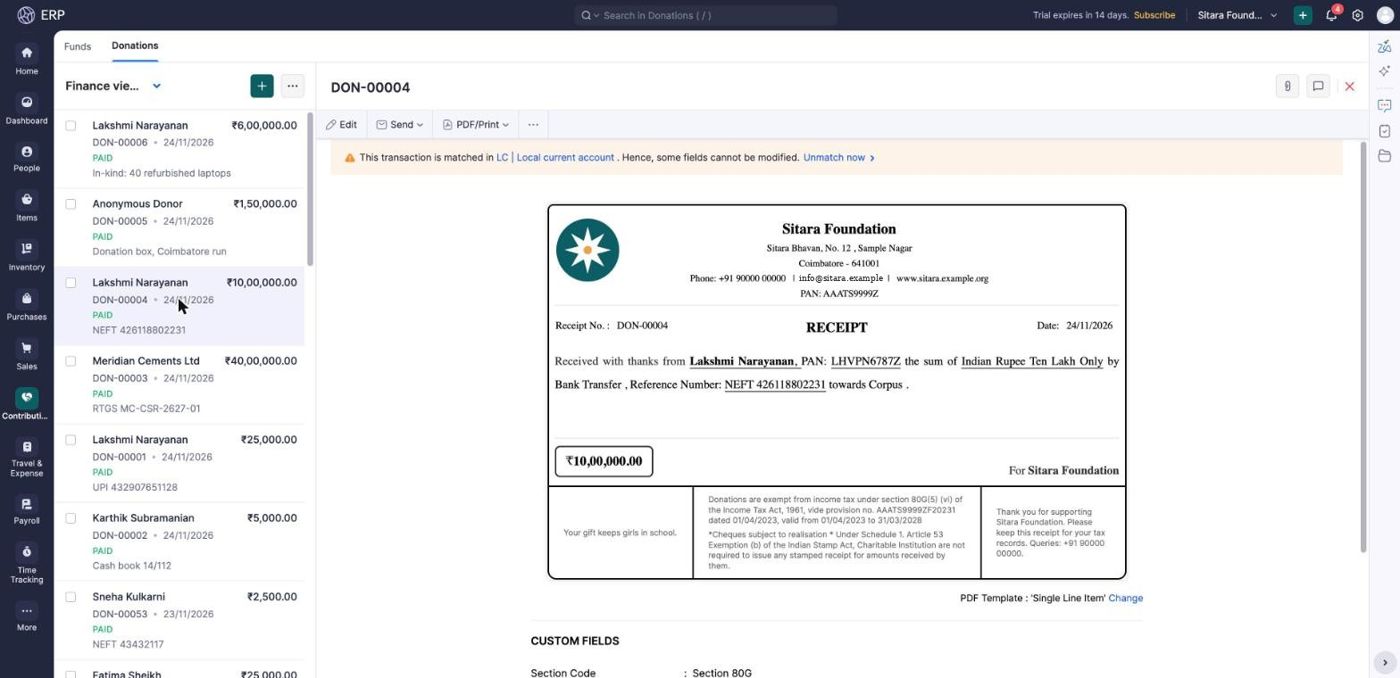
| Books | Accounts, fund and grant tagging, donation receipts, budget vs actuals | Finance |
| People | Staff records, leave, attendance, appraisals | HR |
| Payroll | Salaries and statutory deductions (India and other supported countries) | HR / finance |
| Forms | Donation, volunteer, event and intake forms that feed CRM or Creator | Comms / programmes |
| Campaigns | Donor newsletters, appeals, receipt emails | Comms |
| Analytics | Cross-app dashboards for the board and funders | Leadership / M&E |
| Desk | Helpline or grievance tickets, donor queries | Support / programmes |
| Sign | Grant agreements, MoUs, offer letters, consent forms | Operations |
| WorkDrive | Shared folders per grant, programme and partner | Everyone |
Cross-app architecture: how the pieces connect
The design question is never “which apps?”. It is “which app owns which record?”. We use four systems of record and treat everything else as either input or output.
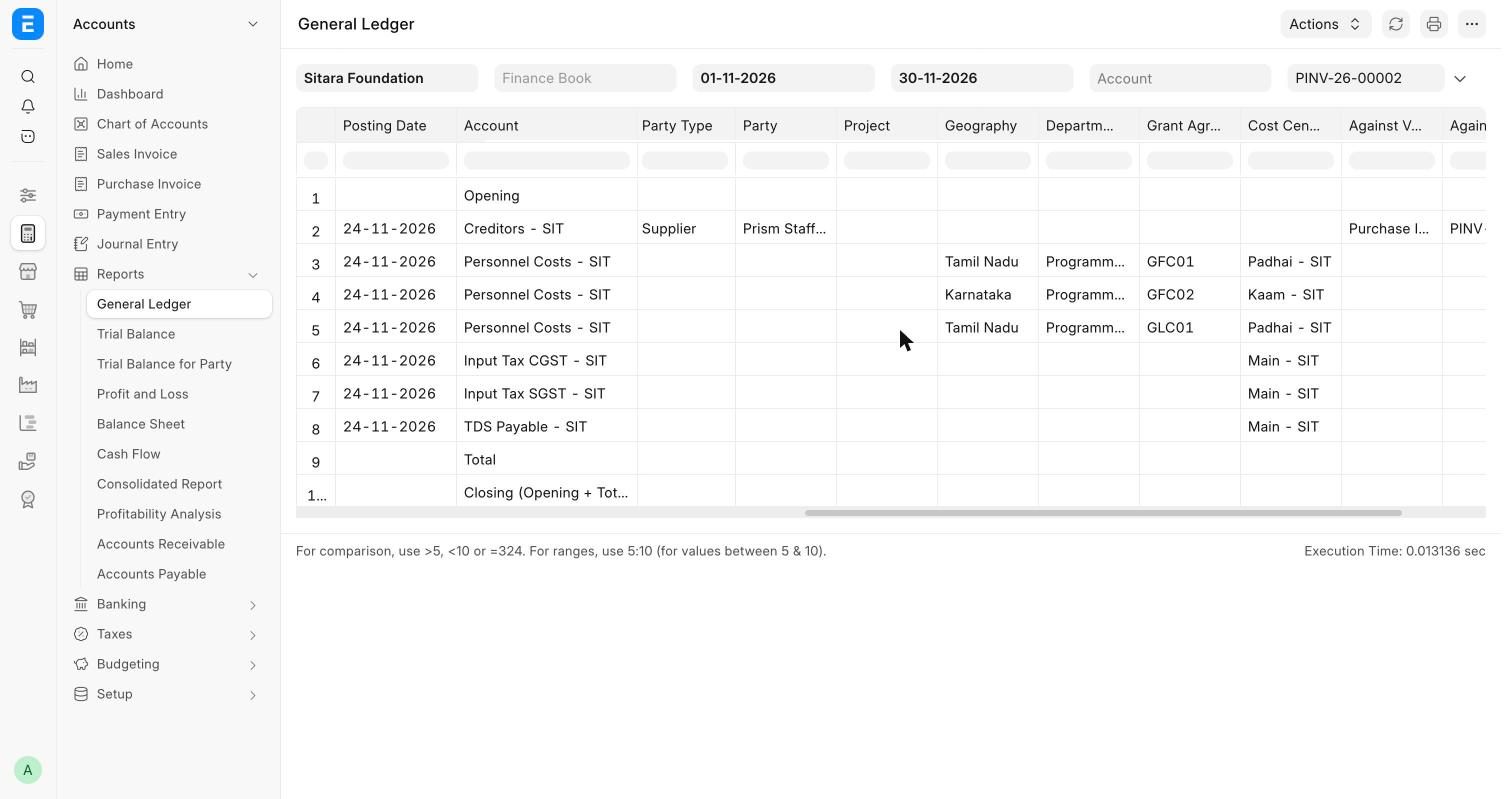
Two rules keep this clean. First, donor data and beneficiary data live in different systems. Our comparison of the best CRMs for nonprofits explains why a fundraising CRM makes a poor beneficiary database. The nonprofit MIS guide covers the programme side, which in Zoho is usually Creator. Second, money only lives in Books. CRM can show a grant’s value, but the budget and the spend are Books’ job.
Beneficiary records also bring legal duties. If you serve people in India, read our plain-English guide to the DPDP Act for NGOs before you design roles and consent fields.
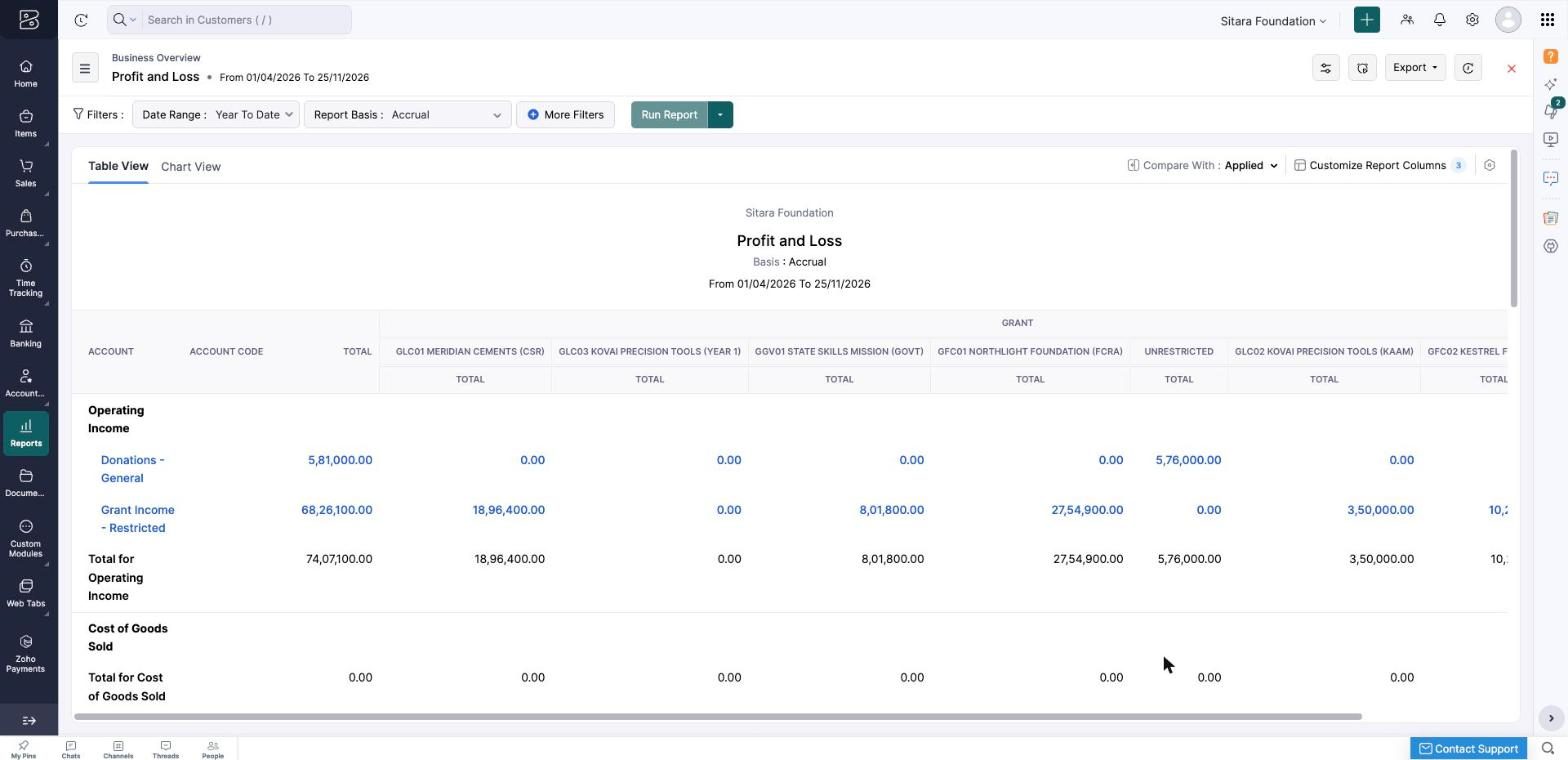
A grant workflow on Zoho One, in six steps
Grants are where the apps earn their keep, because one grant touches fundraising, programmes and finance.
- Prospect to proposal (CRM). Each grant is a Deal with stages: identified, concept note, proposal, due diligence, awarded or declined.
- Agreement (Sign + WorkDrive). The signed agreement and budget go into a WorkDrive folder for that grant, linked from the CRM record.
- Budget set-up (Books). On award, the grant becomes a reporting tag or project in Books, with budget lines matching the funder’s format.
- Delivery (Creator). Field staff log sessions, beneficiaries and indicators against the grant.
- Reminders (CRM). Report due dates become tasks for the grant owner, with escalation if they slip.
- Utilisation report (Analytics). Budget vs actual from Books plus outputs from Creator, in the funder’s template.
If your grant volume is high, or you are a funder, compare this with dedicated tools in our grant management software buyer’s guide. The finance hand-off is the step that most often breaks, so it has its own grant-to-accounting integration field guide. Scholarship programmes follow the same pattern with disbursements added; see scholarship management software.
Zoho One pricing for nonprofits in 2026
Prices below are list prices from zoho.com on 7 November 2026, per person per month, excluding GST or VAT. Zoho changes prices and runs promotions, so check before you buy.
| Licence model | India, billed annually | India, billed monthly | USD, billed annually | USD, billed monthly |
|---|---|---|---|---|
| All-employee (must cover everyone on payroll) | ₹1,250 | ₹2,500 | US$37 | US$45 |
| Flexible user (any number of users) | ₹3,500 | ₹4,000 | US$90 | US$105 |
Nonprofit credits. Zoho for Nonprofits gives registered nonprofits a one-time wallet credit (US$5,000 on zoho.com). It pays 50% of each purchase, renewal or upgrade until the credit runs out, and it is valid for five years. In India, eligible organisations are societies, public trusts and Section 8 companies. In the US, it is 501(c)(3)s. The UK, Canada, Australia and New Zealand have their own categories, and other countries go through TechSoup. Verification takes about 7–10 business days. EdZola’s Built for Impact programme helps eligible nonprofits use these credits; our June 2026 programme note gives the India figure as up to ₹3 lakh.
The all-employee trap. A 60-person NGO with 35 field staff pays for all 60 on all-employee pricing. If only 18 people need logins, flexible pricing costs less, and individual apps may cost less again.
When Zoho One is right, and when it isn’t
| Option | Choose it when | Avoid it when |
|---|---|---|
| Zoho One | Three or more teams need systems. You want one login, one vendor and room to add apps. Budget is tight but staff time is tighter. | Only one team needs software, or most staff on payroll will never log in (all-employee pricing). |
| Single Zoho apps | One clear need (donor CRM, programme MIS, accounts). You are testing Zoho before committing. | You are already paying for four or more apps. Run the numbers again. |
| Microsoft 365 + Dynamics 365 | Your team lives in Outlook, Teams and Excel, you have an in-house IT lead, and a Microsoft partner is in reach. Microsoft still donates up to 300 Business Basic licences (TechImpact). | You expect free Business Premium. That grant ended on 1 July 2025; discounts of up to 75% replaced it. |
| Google Workspace + Salesforce | Global or US-funded organisation with a Salesforce admin. Google's nonprofit edition is free (Google) and Salesforce donates 10 Agentforce Nonprofit Enterprise licences (Salesforce Ben). | You lack admin capacity. Free licences are not a free implementation. |
A common and sensible pattern: keep Google Workspace or Microsoft 365 for email and documents, and use Zoho for your systems of record.
Product decision matrix
| If your main need is… | Start with | Move to Zoho One when… |
|---|---|---|
| Donor and CSR relationships | Zoho CRM (or Bigin if one to two fundraisers) | Finance wants grant budgets linked to the pipeline |
| Programme and beneficiary data | Zoho Creator | You also need CRM, HR or Books |
| Accounts and donation receipts | Zoho Books | You want grant spend reported with outputs |
| HR and payroll | Zoho People + Payroll | Other teams need systems too |
| Grant pipeline and reporting | CRM + Books + Creator | Straight away: that is already three apps |
| Board dashboards across teams | Analytics on top of existing apps | Data sits in three or more Zoho apps |
A phased Zoho One implementation plan
We rarely switch everything on at once. A typical rollout:
| Phase | Weeks | What happens | Done when |
|---|---|---|---|
| 0. Fit and licence | 1–3 | Process map, licence model choice, nonprofit credit application | Credits approved, licence bought |
| 1. Foundation | 2–4 | Directory, roles, WorkDrive structure, Books chart of accounts and grant tags | Every user logs in once |
| 2. Fundraising core | 4–8 | CRM pipeline, Forms, Campaigns, Sign templates, data migration | Fundraising team signs off |
| 3. Programme MIS | 6–16 | Creator apps, offline field forms, links to CRM grants | Field team uses it for a full reporting cycle |
| 4. People and Payroll | 4–10 | People first, Payroll after employee data is clean | One parallel payroll run matches |
| 5. Insight and hypercare | 4–8 | Analytics dashboards, 30–60 days of hypercare after go-live | Board pack generated from the system |
Three lessons from our delivery work shape this plan:
- Accept each app separately. In a three-app rollout for a disability-inclusion nonprofit, CRM and Projects moved into user testing while People waited on requirements. Separate sign-off for each app kept progress visible instead of stuck behind the slowest stream.
- Payroll waits for clean People data. On a recent HR project, the payroll phase was paused until employee records were complete. Plan for that. A failed first payroll destroys trust faster than any other bug.
- Connect the HR chain end to end. For Atma, we brought Zoho People, Payroll, Expense and Recruit together as one HRMS. That covers the employee journey from first interview to monthly payroll.
Single-app timelines from our published case studies give a sense of scale. TRRAIN’s programme MIS on Zoho Creator took four months. NeevJivan Foundation’s donor CRM took two months, and Aangan Trust’s move to Zoho People took four. If you are earlier in the journey, the five-step nonprofit digital transformation guide helps you sequence the bigger change.
Where we have built this
Frequently asked questions
Is Zoho One free for nonprofits?
No. Registered nonprofits can apply for Zoho for Nonprofits wallet credits (US$5,000 one-time on zoho.com), which pay 50% of each transaction until the credit runs out. Check with Zoho that Zoho One is covered before you rely on it.
How much does Zoho One cost in India?
On 7 November 2026, zoho.com listed ₹1,250 per employee per month for all-employee pricing and ₹3,500 per user per month for flexible users, billed annually and excluding GST. Monthly billing costs more. Check the live page before buying.
Should we choose all-employee or flexible-user pricing?
Divide the all-employee price by the flexible price. In India that is about 36%. If more than that share of your payroll staff need logins, all-employee pricing is cheaper. Otherwise, choose flexible.
Which Zoho One apps should a nonprofit set up first?
Usually CRM for fundraising and Books for finance, then Creator for programme data, then People and Payroll. Start with the team where scattered spreadsheets cost you the most.
Can Zoho One handle grant management?
Yes, for nonprofits receiving grants: CRM for the pipeline, Books for budgets and spend, Creator for deliverables, Analytics for utilisation reports. Funders running large open calls may need a dedicated grantmaking tool.
Is Zoho One better than Microsoft 365 for an NGO?
They do different jobs. Microsoft 365 covers email, documents and Teams. Zoho One adds CRM, accounting, HR and custom apps. Many NGOs keep Microsoft 365 or Google Workspace and add Zoho for their systems of record.
How long does a Zoho One implementation take?
For a small to mid-sized nonprofit, three to six months in phases. A single app such as CRM can go live in about two months.
Get a Zoho One fit check
Tell us your headcount, how many people need logins, and which three processes hurt most. In a 45-minute call we will come back with a licence model comparison (all-employee vs flexible vs individual apps), a check on your nonprofit credit eligibility, and a phased plan with the first app to switch on. No upselling. If single apps suit you better, we’ll say so.